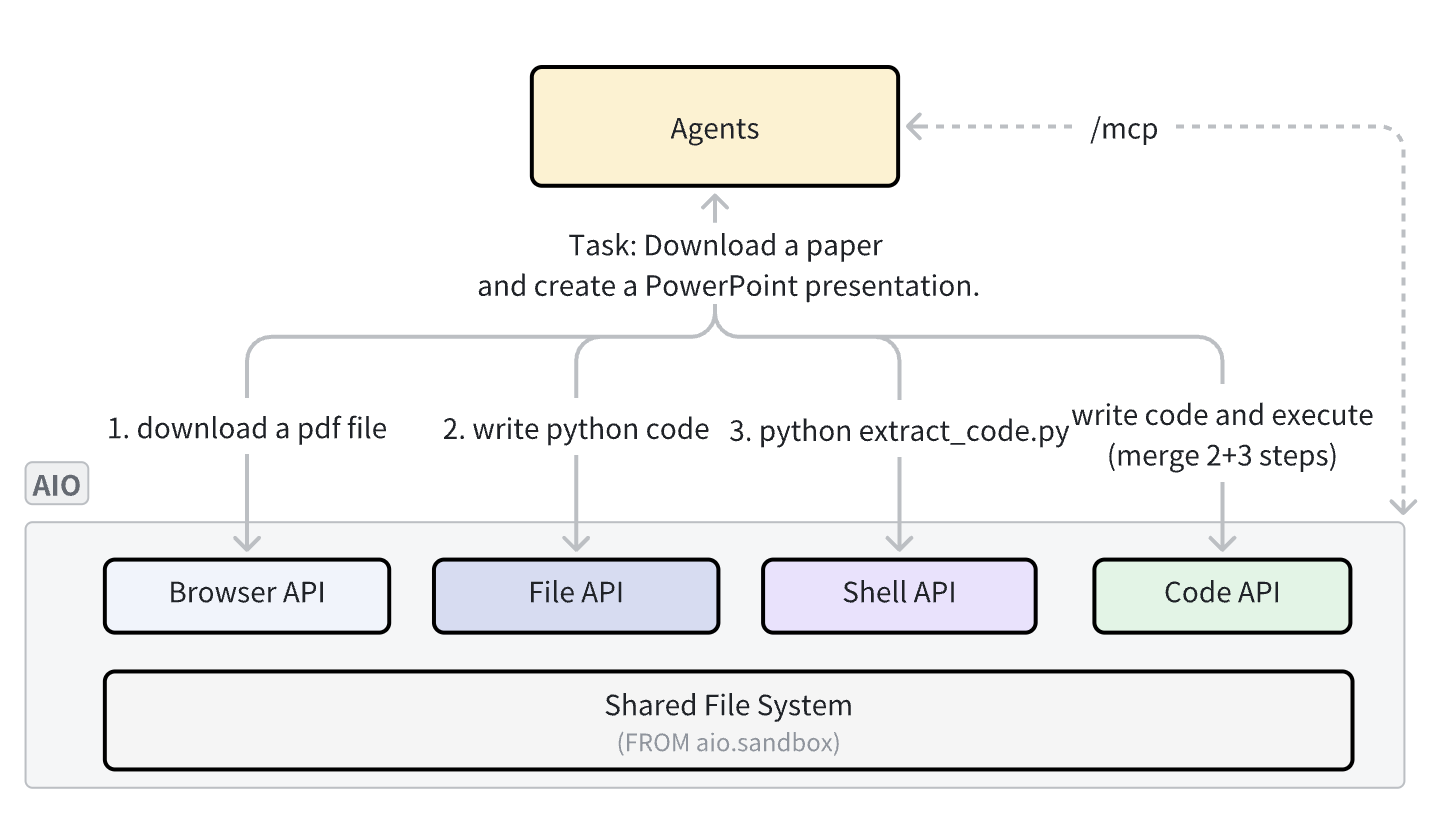
Introduction: When executing complex tasks, AI Agents often need to switch among the browser, code execution, and file system. Traditional multi-sandbox solutions face issues such as fragmented environments, data movement, and complex authentication. AIO Sandbox integrates all capabilities through a single Docker image, providing a unified file system and authentication, while also supporting image customization, improving the efficiency of Agent task execution and delivery.
Background
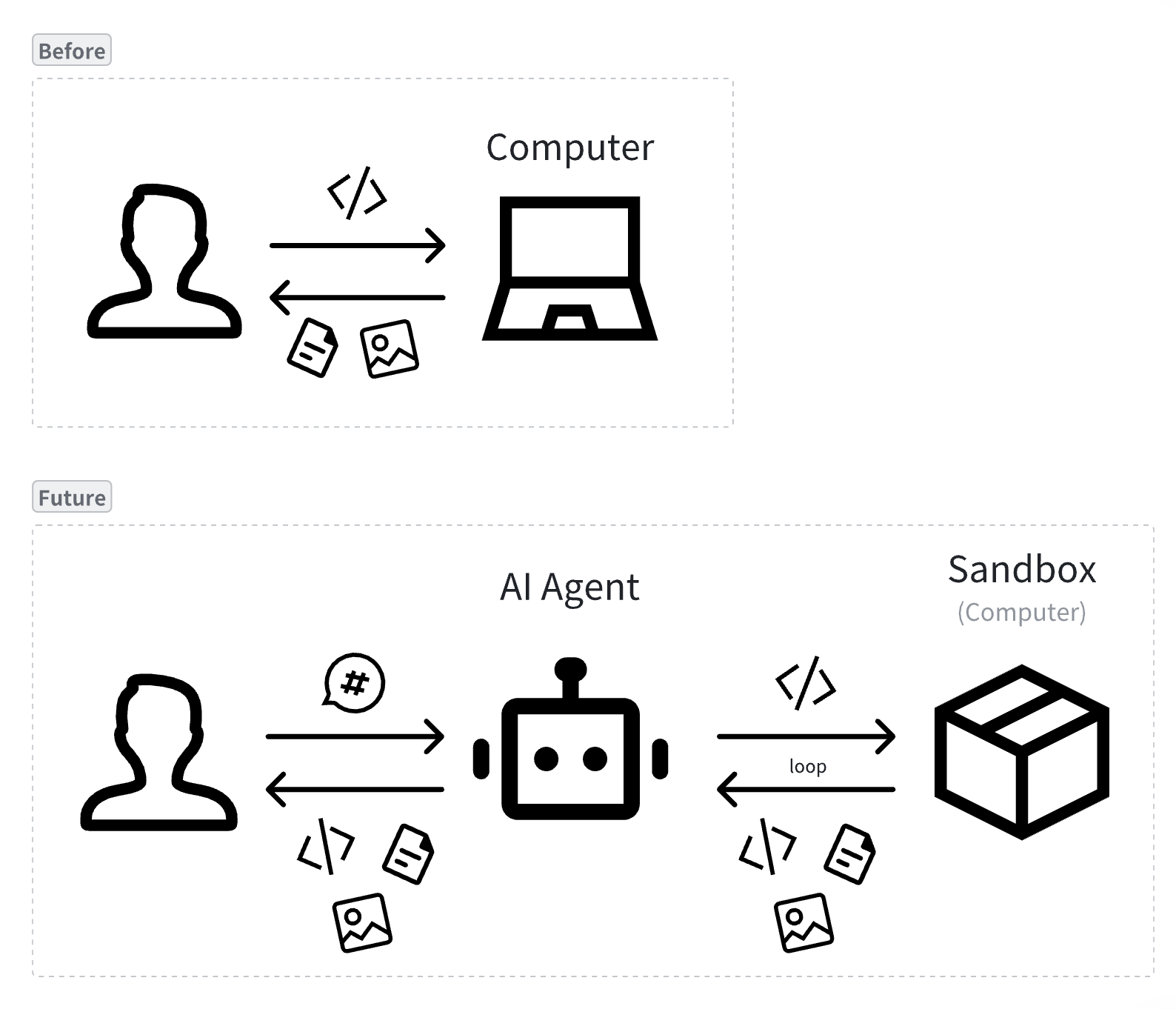
As LLMs continue to evolve, AI application paradigms have gone through three generations:
- Chatbot: conversational interaction, answering questions
- Copilot: assisted collaboration, improving efficiency
- Agent: autonomous execution, completing tasks
Agents can autonomously perceive the environment, plan steps, and call tools. They can operate computers like humans: automatically browse web pages to collect information, generate and run code to analyze data, execute system commands to manage files, and even complete complex multi-step operations through graphical interfaces. This capability enables Agents to deliver results that approach or even exceed human professional standards.
Pain Points
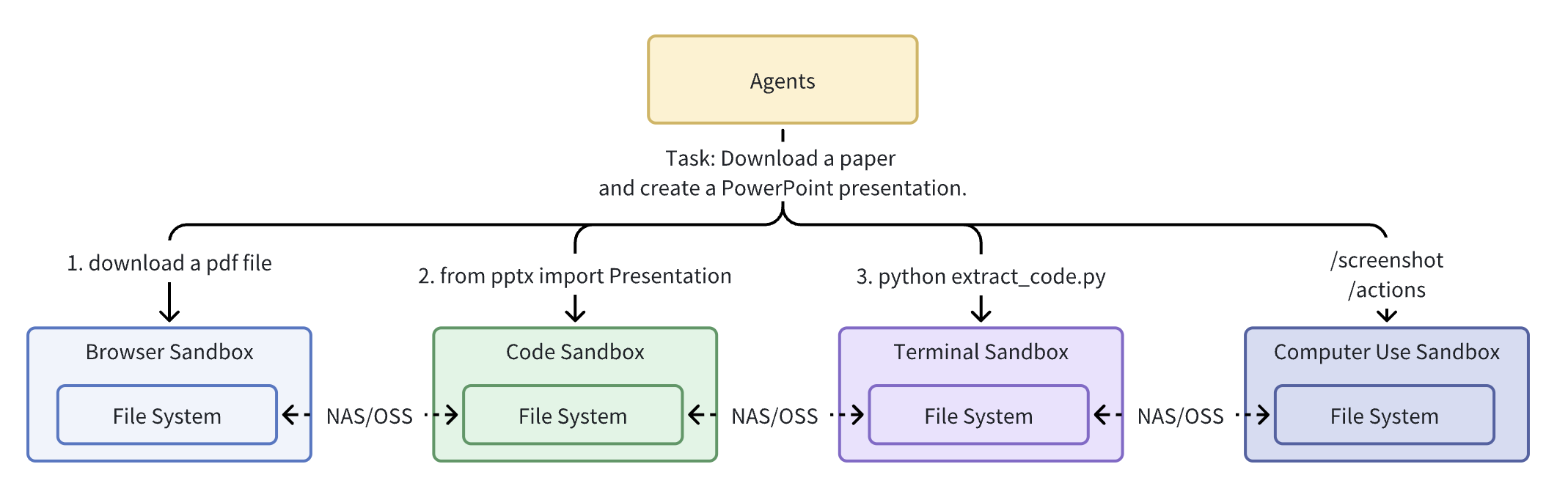
- 🧩 Fragmented environments: Multiple single-purpose sandboxes (such as E2B for code execution and Browserbase for browsers) force Agents to transfer data across sandboxes via NAS/OSS, increasing latency and complexity. For example, when a deep research Agent completes the task “turn a paper into a PPT,” it needs to exchange dozens of intermediate files (JSON configs, chart images, preview screenshots, etc.) across multiple sandboxes, increasing the complexity and overhead of the entire Agent system.
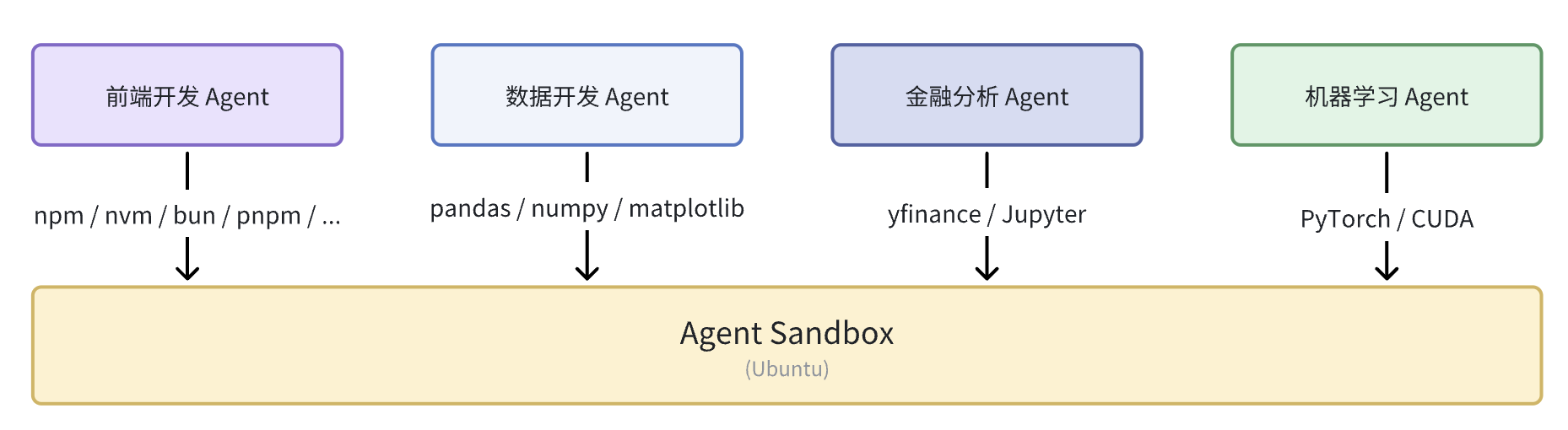
- 🎁 Difficult customization: Different types of Agents need different preinstalled technology stacks. Traditional sandboxes provide a unified preinstalled environment, which cannot satisfy the personalized needs of all Agents.
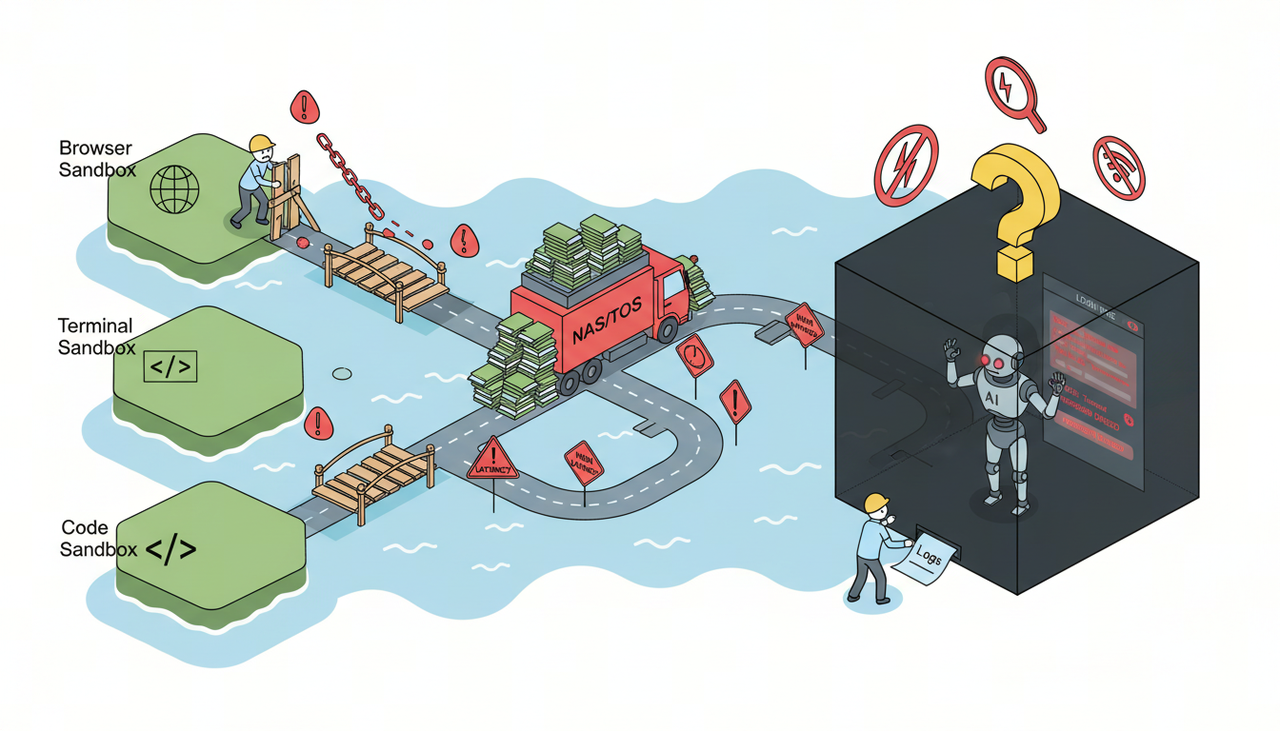
- 🔒 Difficult security isolation: Agents need access to real system capabilities (network, files, browser, GPU), while strong isolation is required to prevent privilege escalation and data leakage.
- 🖥️ Difficult visual interaction: Complex Agent tasks require human takeover. Functional sandboxes need to integrate VNC, Terminal, and VSCode to maintain a consistent experience, including resolution switching, screenshots, and GUI visual operations.
- 🌐 High browser environment complexity: Anti-automation and fingerprint risk control, CDP instability, incomplete support for proxies with username/password, and lack of GUI operations.
A well-configured computer can significantly improve human office productivity; likewise, a powerful sandbox environment can improve an Agent’s task quality and execution speed.
Introduction
In one sentence: AIO Sandbox integrates foundational capabilities such as browser, code execution, terminal, visual takeover, forward and reverse proxy, MCP, and authentication into a single sandbox, and supports sandbox environment customization according to requirements, enabling different Agents to “complete tasks more efficiently in one environment container.”
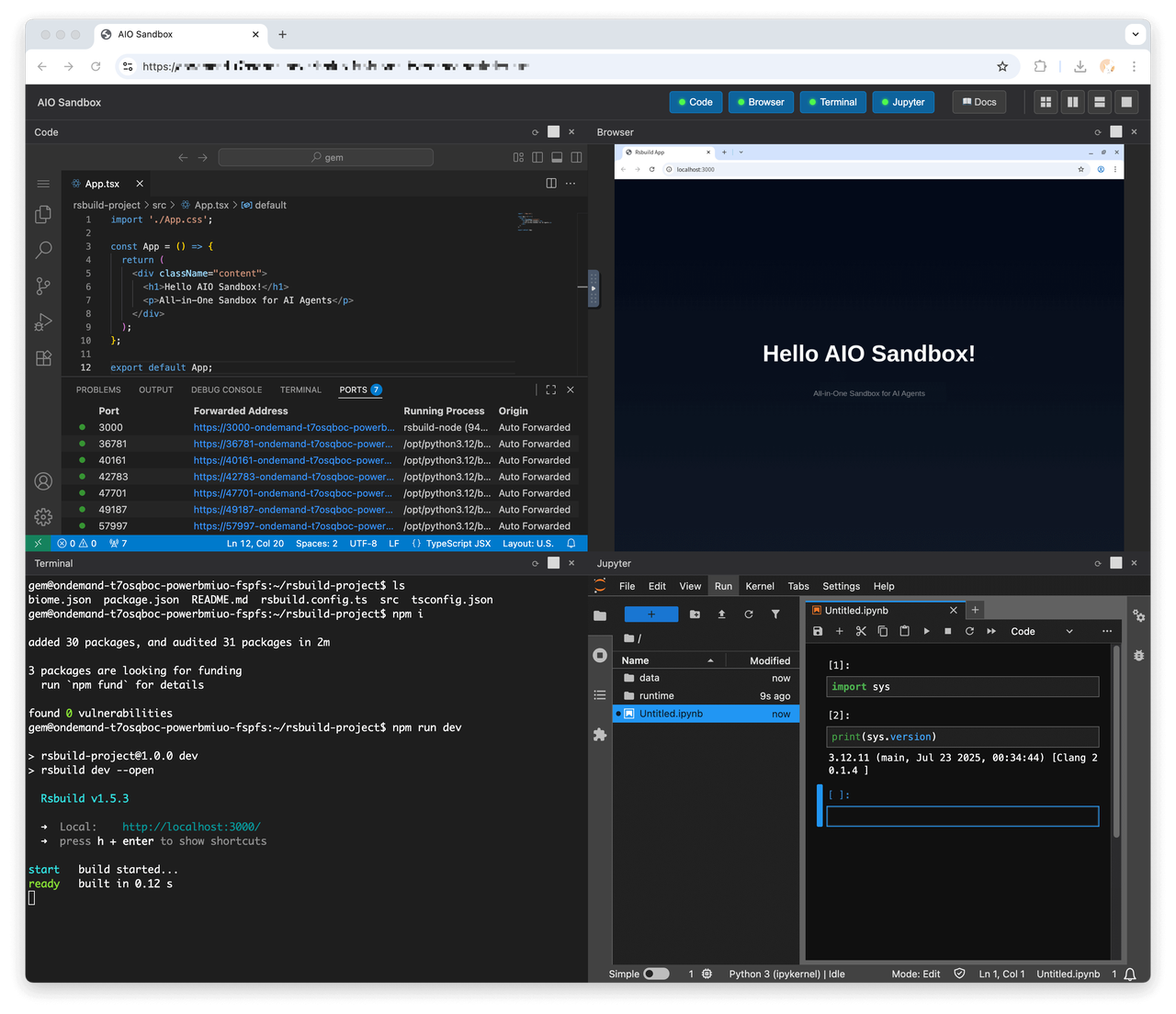
- Official website: sandbox.agent-infra.com
- Github: github.com/agent-infra/sandbox
- API: sandbox.agent-infra.com/api
- Paper: arxiv.org/pdf/2509.02544#S2.SS2
Features
- 📦 Out of the box: Connect directly to sandbox capabilities through the
/mcpprotocol, while also providing API / SDK support to customize the sandbox toolset. - 🚀 Starts in seconds: All sandbox services start within seconds, and can be brought up in milliseconds after pre-caching/cold start.
- 🌈 Customizable: Agents in vertical scenarios require domain tools and dependencies; AIO uses a unified base image and supports on-demand extension through convention-based routing and service configuration.
- 🌐 Browser: Integrates Web Infra’s lightweight RS kernel, providing CDP, screenshots, pure-vision GUI operations, and Proxy configuration.
- 🔄 Human takeover: Provides browser VNC, Code Server, and Terminal, supporting human takeover and debugging during tasks.
- 📡 Proxy and forwarding: Supports forward proxies with credentials; maps
{port}-{domain}wildcard domains or/proxy|/absproxy/{port}paths to services inside the sandbox (convenient for previews/demos). - 🔒 Securityauthentication: JWT Bearer access control; provides short-lived tickets for links that cannot carry Headers.

Examples
| Instruction | Replay | Screenshot |
|---|---|---|
| Help me design an interesting website that introduces sauropod dinosaurs from the Jurassic and Cretaceous periods to elementary-school children. I’d like the website to have a cartoon style. | Replay | 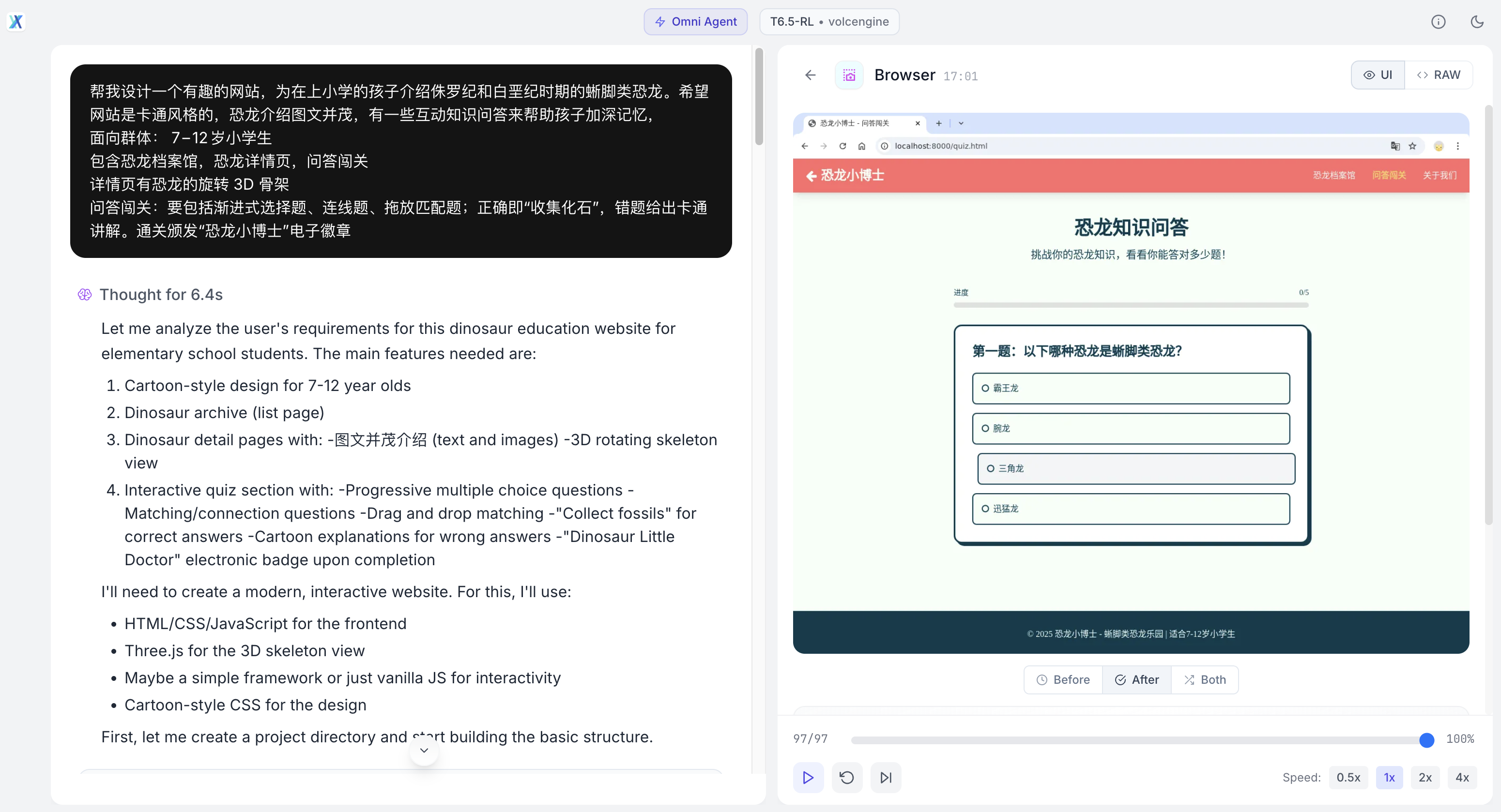 |
| Search for news about ByteDance’s Seed 1.6 model, then build and deploy a modern-style web page. | Replay | 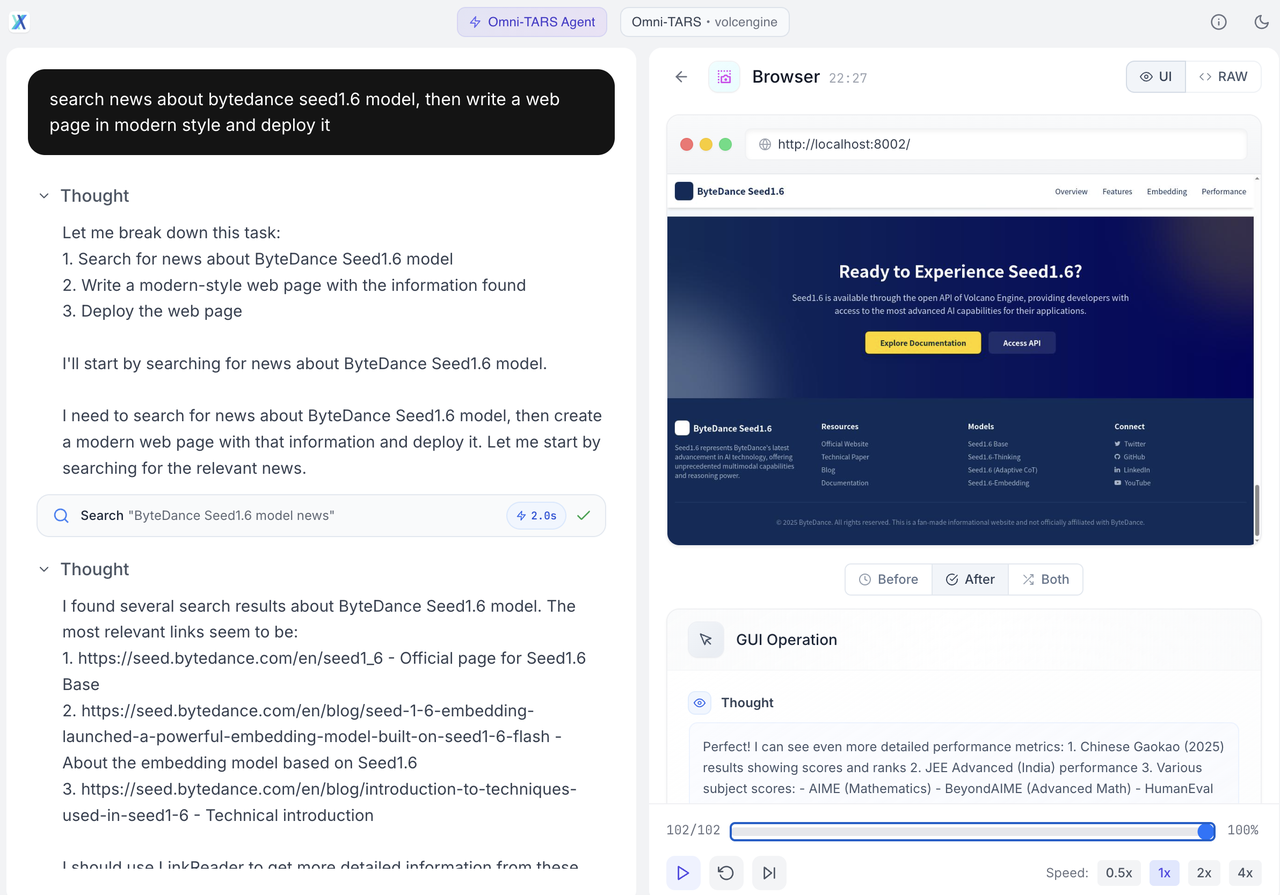 |
| Based on this OSWorld image, please look up the latest information on the Internet and design a modern website for it. | Replay | 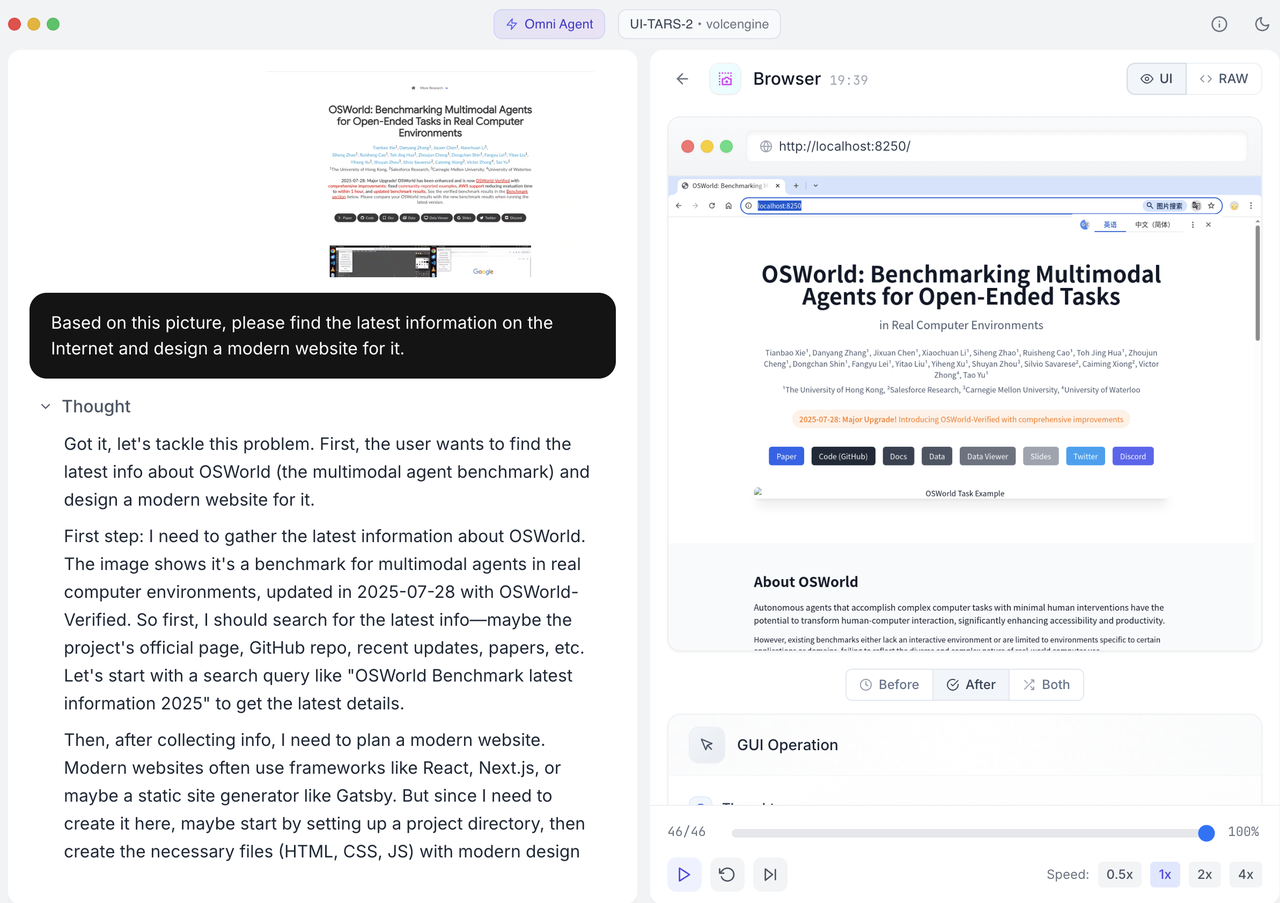 |
| Play the Poki 2048 game | Replay | 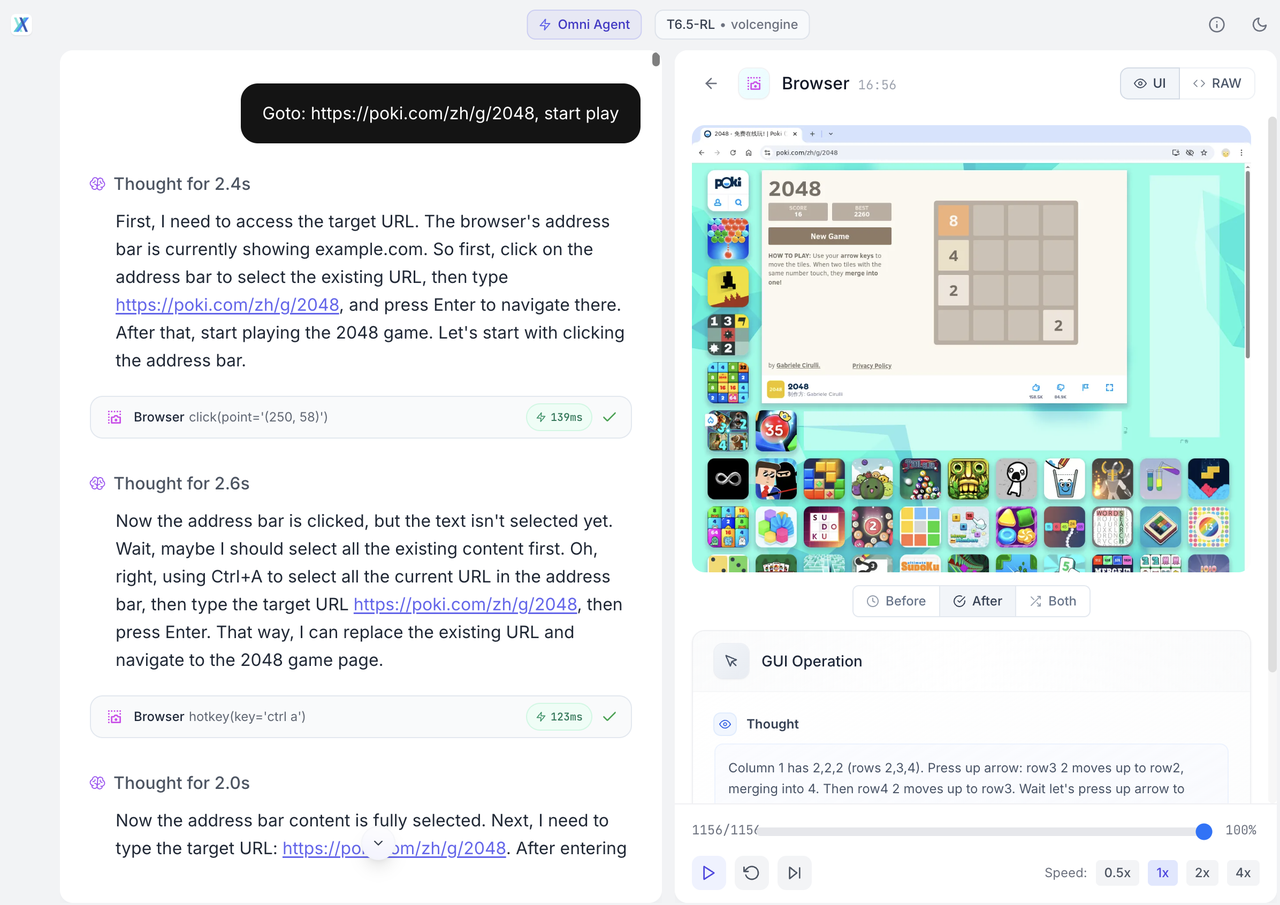 |
See more at: https://seed-tars.com/showcase/ui-tars-2
Quick Start
Cloud
One-click deployment of the All-in-One Sandbox app — Function Service - Volcano Engine
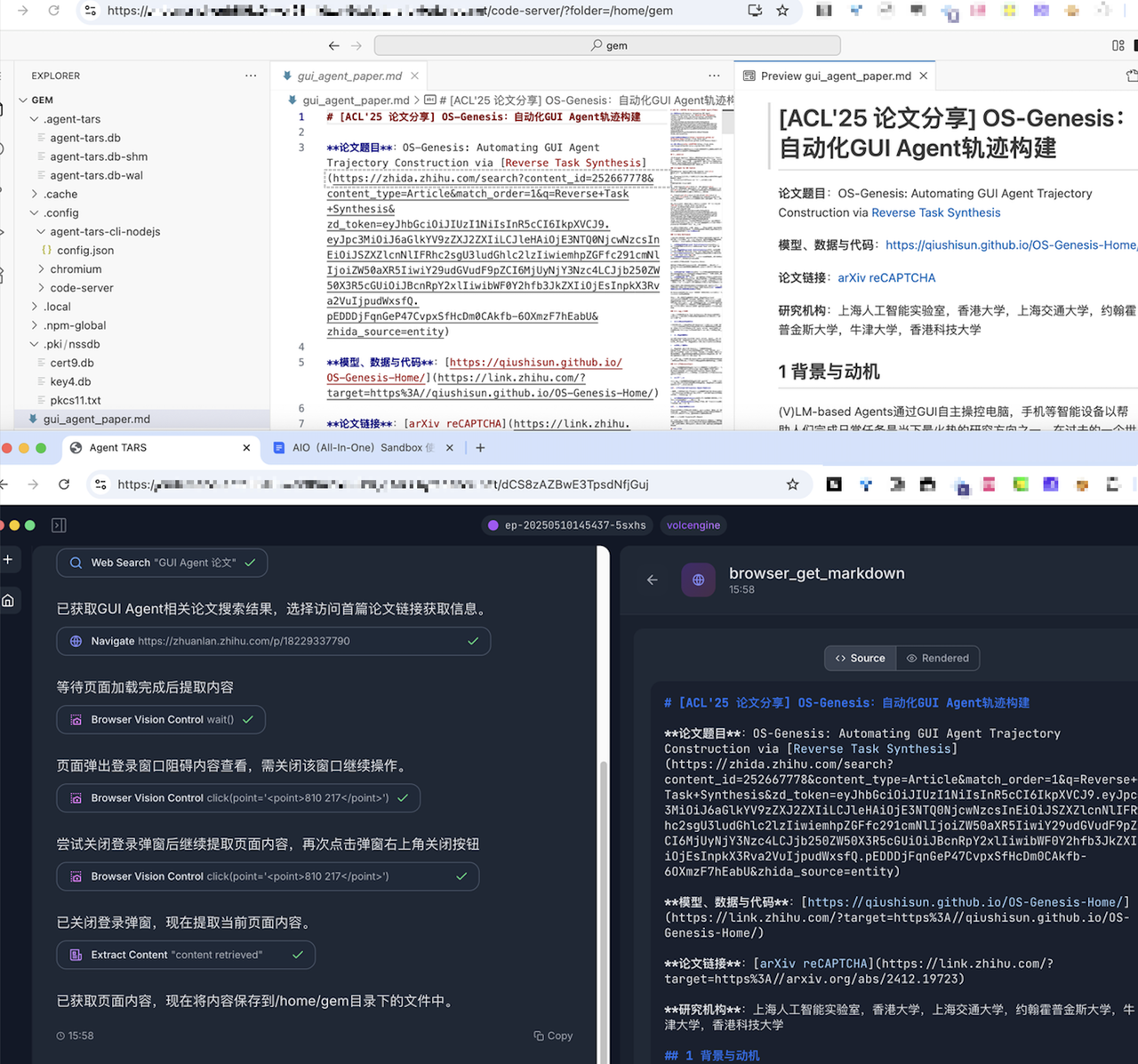
Local
Prerequisite: install Docker. Start locally with one command:
docker run --security-opt seccomp=unconfined --rm -it -p 8080:8080 ghcr.io/agent-infra/sandbox:latest

# 国内加速访问
# docker run --rm -it -p 8080:8080 enterprise-public-cn-beijing.cr.volces.com/vefaas-public/all-in-one-sandbox:latest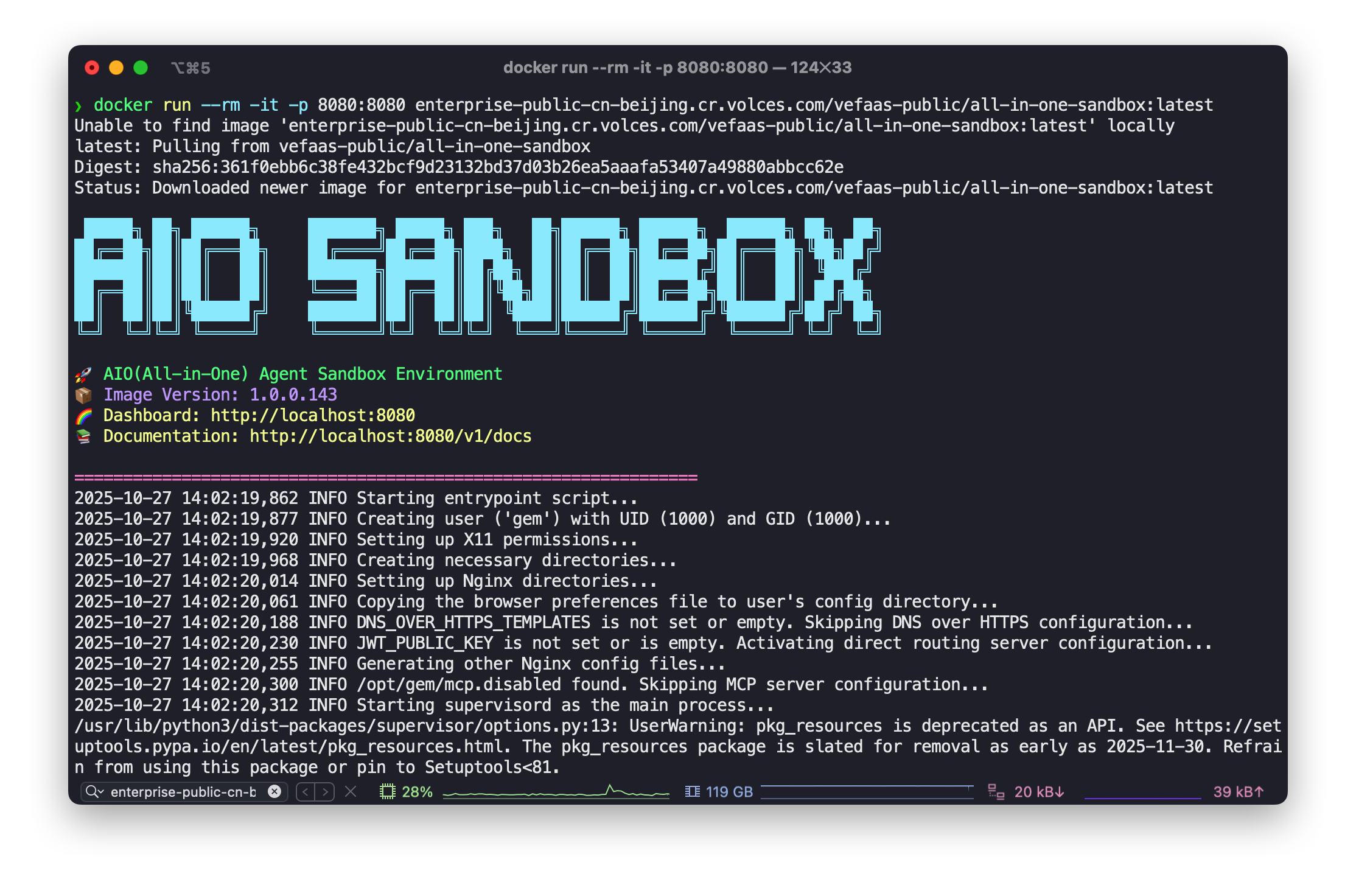
System Architecture
Overall
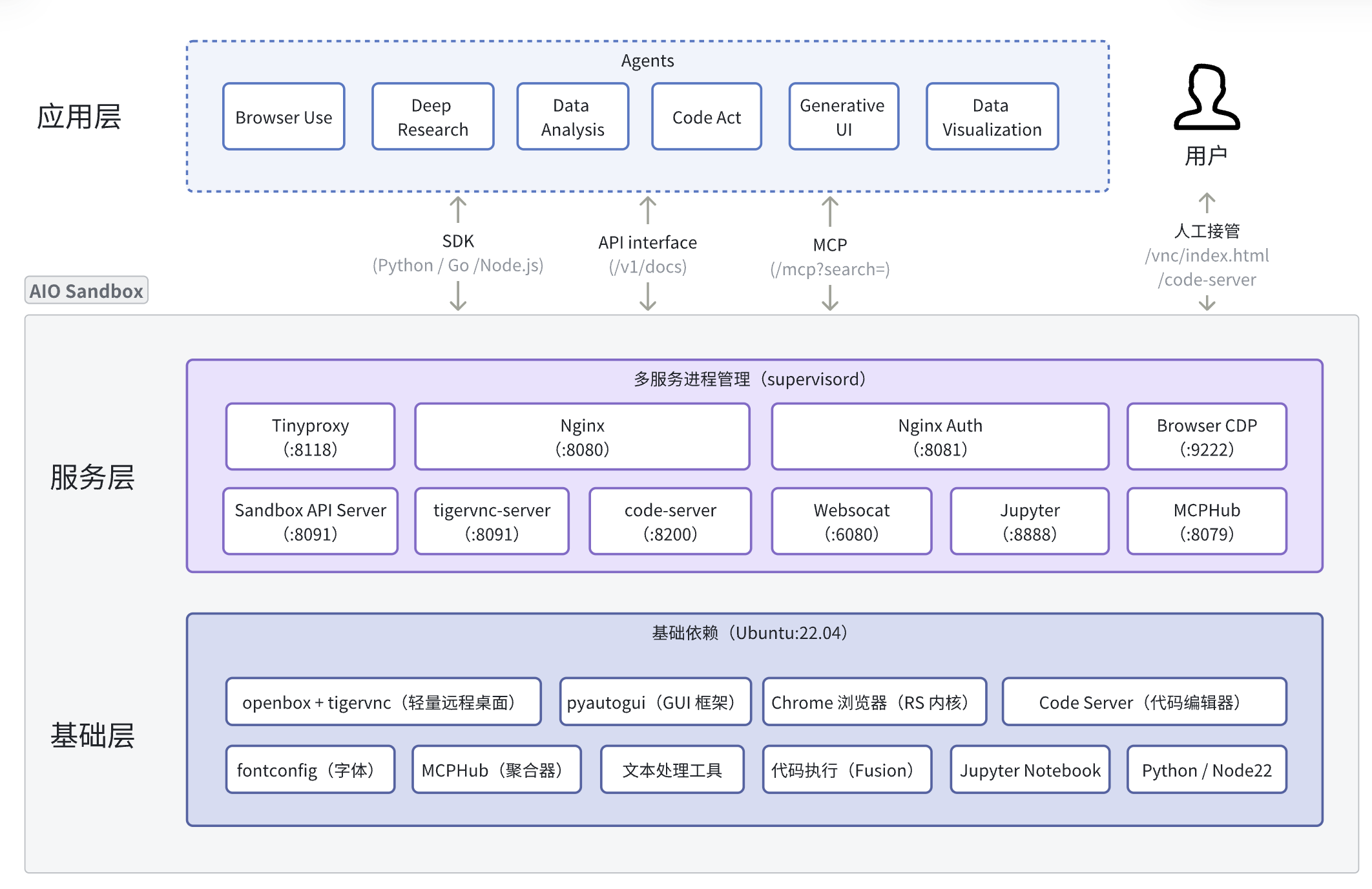
AIO Sandbox provides Agents with foundational capabilities such as Browser, File, Shell, and Code, and offers extensibility to support developers in composing and customizing dedicated sandboxes according to Agent requirements (such as AIO Sandbox for 移动端/医疗/法务/金融/科研).
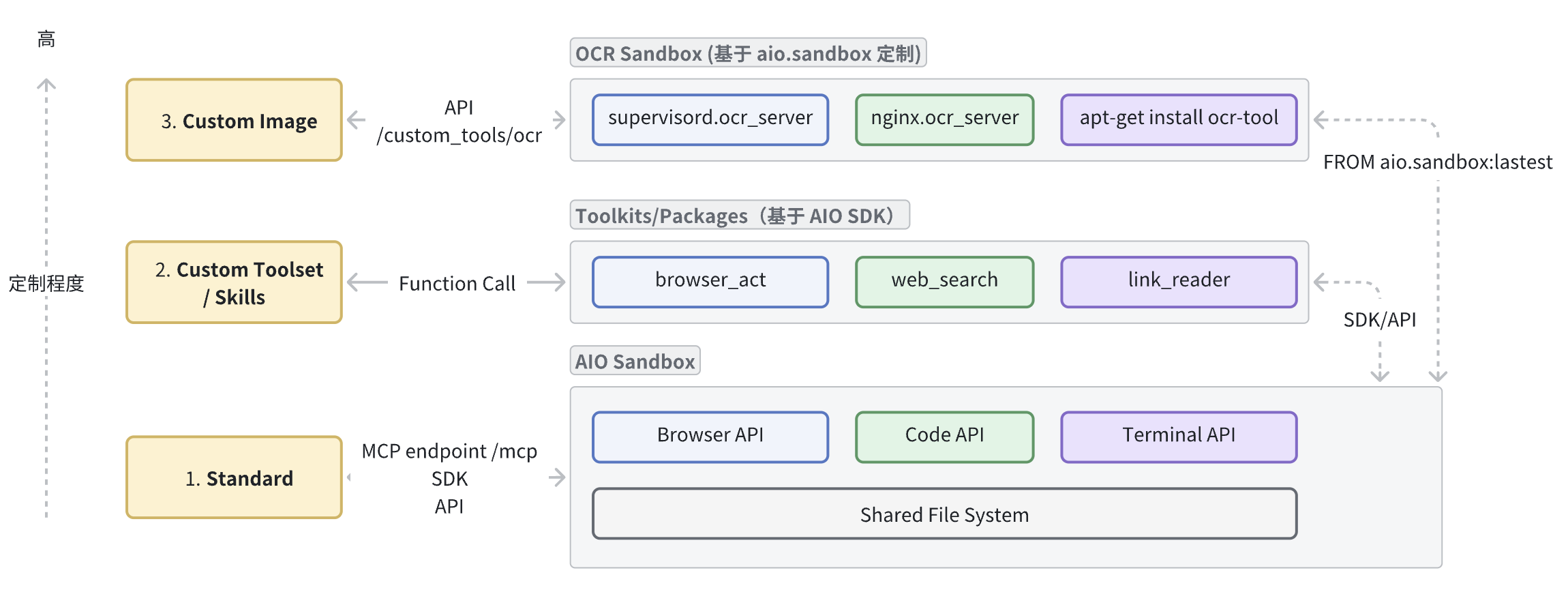
The degree of sandbox customization increases in the following order:
- Standard (out of the box): Plug-and-play for Agents through the
/mcpendpoint, suitable for rapid PoC Agent validation. - Custom Toolset (tool / Skills extension): Without changing the image, add or orchestrate tools based on SDK / API (such as adding
web_searchsearch); also extend Skills to automate specific sandbox tasks. - Custom Image (custom image): Based on the
FROM aio.sandboxbase image, install specific foundational dependencies (such as multimedia/image processing), and mount custom services (for example,/custom_tools/ocrimage recognition).
Core Components
Browser
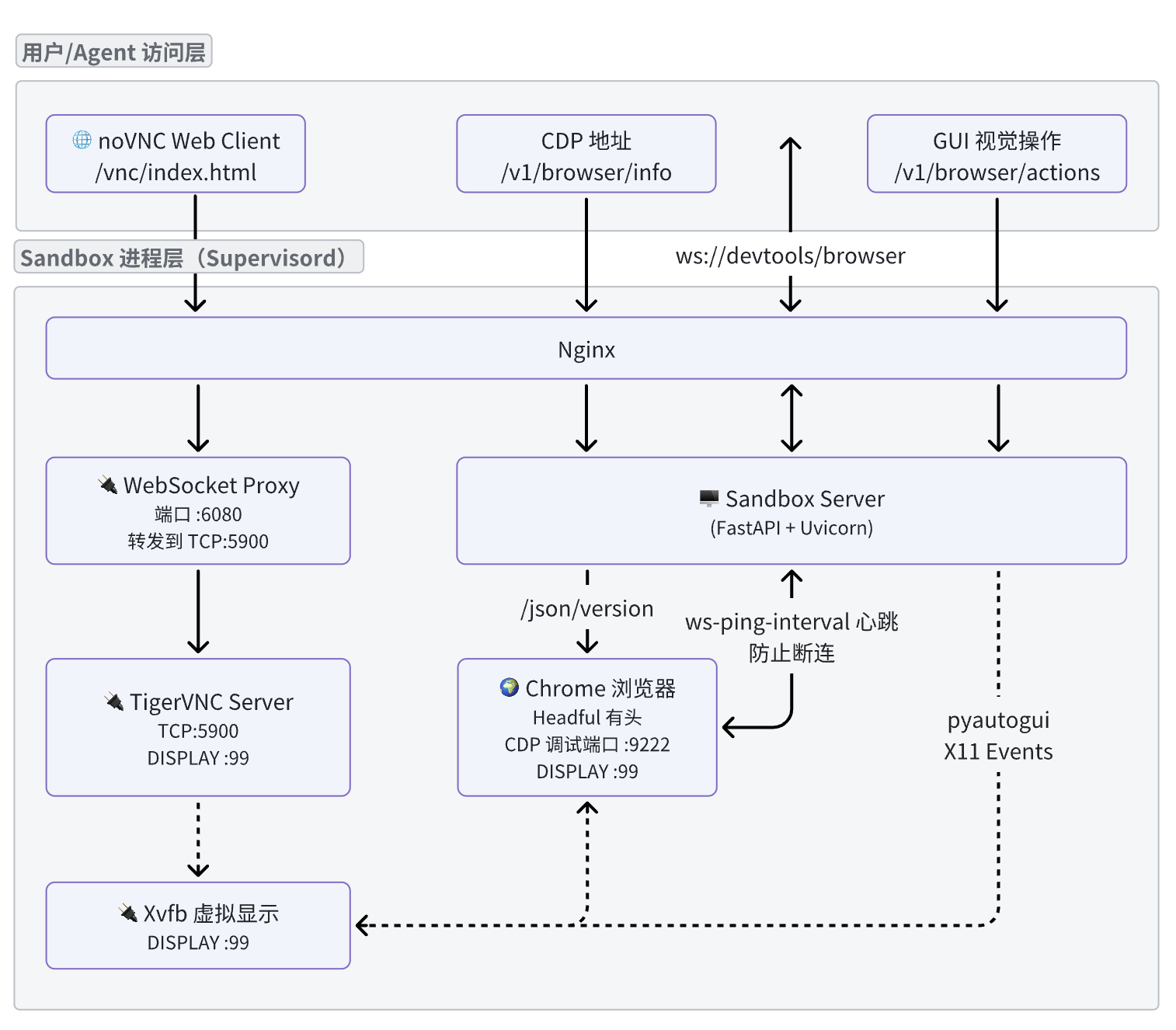
For an Agent-oriented browser environment, the key is to provide CDP and VNC, so mainstream Browser Use frameworks can use it directly; AIO provides an x11-based browser GUI visual operation interface, which can be combined with CDP to produce a more efficient Browser Use solution with a lower risk-control rate.
CDP
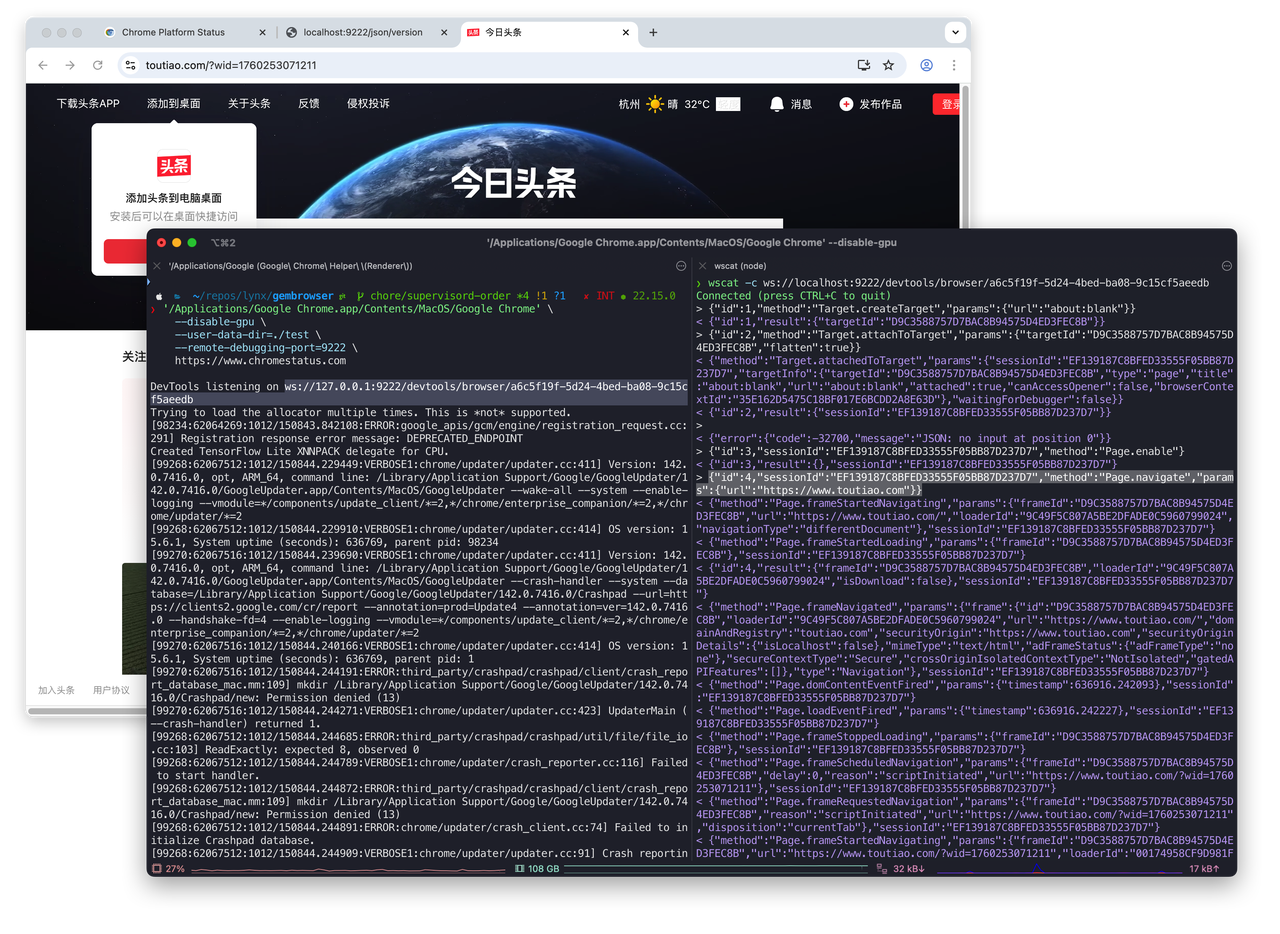
CDP (Chrome Devtools Protocol) is a protocol for communicating with Chrome or Chromium browsers. It provides browser control APIs through WebSocket, enabling navigation and loading, DOM operations, JS execution/debugging, network interception and simulation, screenshots and rendering, security and permissions, and more. For a more intuitive understanding, the following example uses CDP to issue a navigate instruction:
'/Applications/Google Chrome.app/Contents/MacOS/Google Chrome' \
    --disable-gpu \
    --user-data-dir=./test \
    --remote-debugging-port=9222 \
    https://www.chromestatus.com
Visit http://localhost:9222/json/version; webSocketDebuggerUrl is the CDP address:
$ curl http://localhost:9222/json/version
{
   "Browser": "Chrome/141.0.7390.66",
   "Protocol-Version": "1.3",
   "User-Agent": "Mozilla/5.0 (Macintosh; Intel Mac OS X 10_15_7) AppleWebKit/537.36 (KHTML, like Gecko) Chrome/141.0.0.0 Safari/537.36",
   "V8-Version": "14.1.146.11",
   "WebKit-Version": "537.36 (@95681a3c3d516c397b75ff45b8980c1088666775)",
   "webSocketDebuggerUrl": "ws://localhost:9222/devtools/browser/a6c5f19f-5d24-4bed-ba08-9c15cf5aeedb"
}
After establishing a WebSocket connection with CDP, you can execute browser instructions:
Note: AIO Sandbox does not directly expose the CDP endpoint
/json/version; instead, it proxies CDP through a uvicorn service and adds heartbeat detection to avoid ws disconnection issues.
GUI Visual Operations
Screenshot
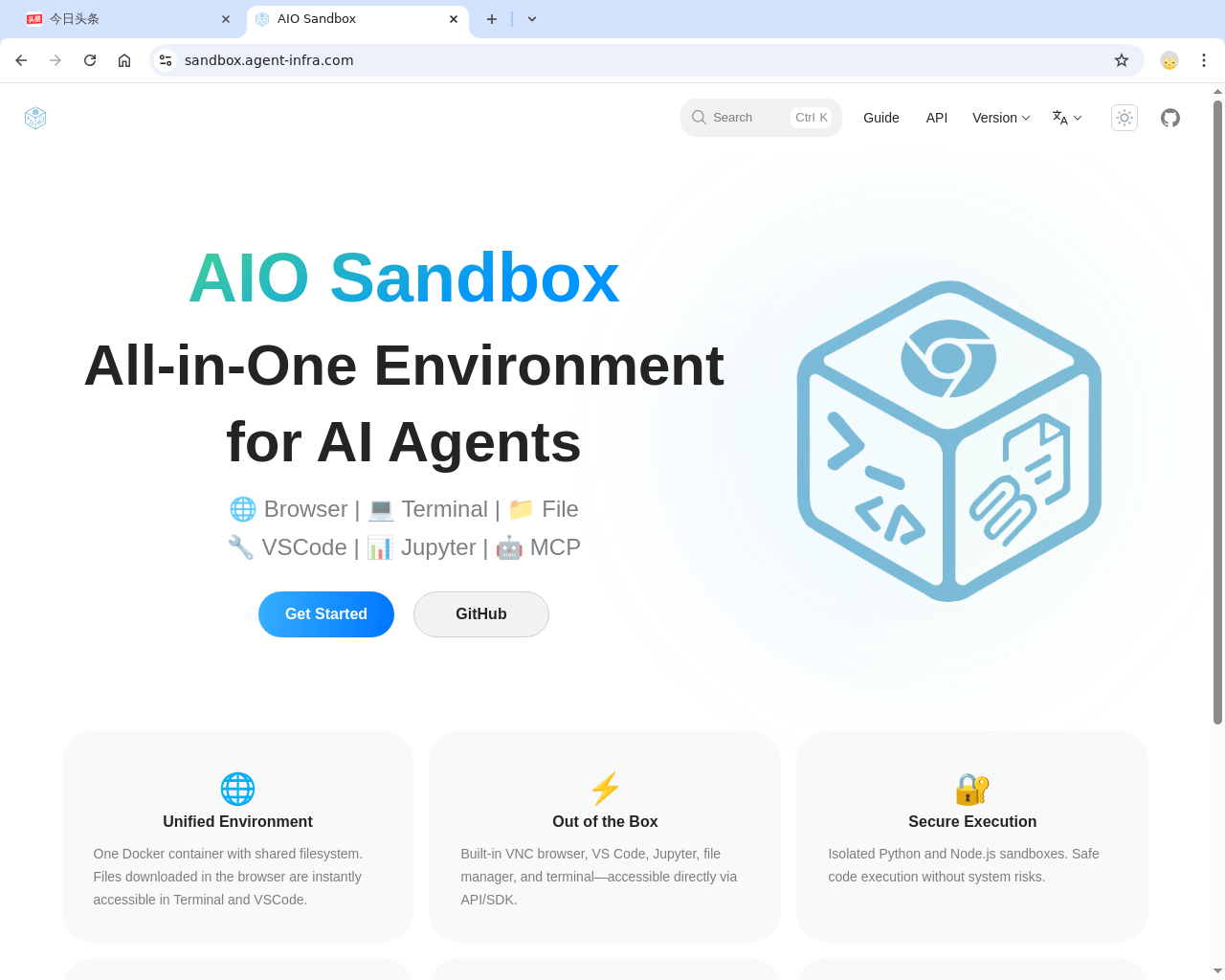
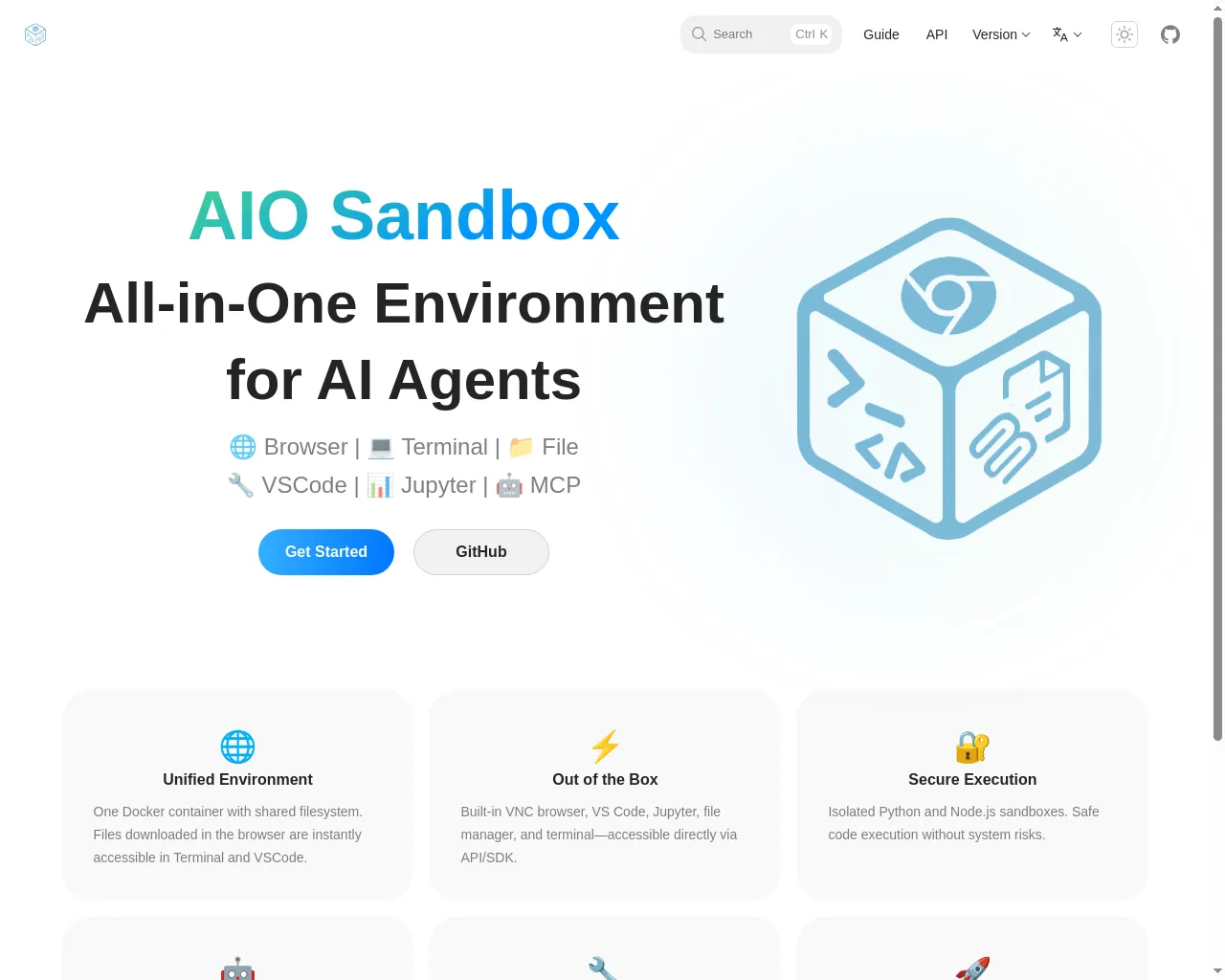
Unlike CDP-based screenshots, the visual screenshot /v1/browser/screenshot includes Tabs (that is, the entire browser window), and operations target the entire browser window.
| GUI browser screenshot (Tabs) | CDP-based page screenshot (Page) |
|---|---|
 |  |
Unlike CDP browser operations, visual operations /v1/browser/actions simulate human behavior for clicking, typing, scrolling, and other actions, reducing the risk-control strategies of target websites.
Unified action space GUI operations are abstracted into composable minimal atomic actions, such as moving the mouse, clicking, dragging, scrolling, key presses, text input, as well as additional tool functions such as waiting, aligning as much as possible with the consistency of VLM vision models when executing real actions.
| action_type | Description | Required parameters | Optional parameters |
|---|---|---|---|
MOVE_TO | Move the mouse to the specified position | x, y | - |
MOVE_REL | Move the current mouse position relatively | x_offset, y_offset | - |
CLICK | Click operation | - | x, y, button, num_clicks |
MOUSE_DOWN | Press the mouse button | - | button |
MOUSE_UP | Release the mouse button | - | button |
RIGHT_CLICK | Right-click | - | x, y |
DOUBLE_CLICK | Double-click | - | x, y |
DRAG_TO | Drag to the specified position | x, y | - |
DRAG_REL | Relative drag from the current mouse position | x_offset, y_offset | - |
SCROLL | Scroll operation | - | dx, dy |
TYPING | Enter text | text | - |
PRESS | Key press | key | - |
KEY_DOWN | Press a keyboard key | key | - |
KEY_UP | Release a keyboard key | key | - |
HOTKEY | Key combination | keys (array), for example: ["ctrl", "c"] | - |
WAIT | Wait | duration time (seconds s) | - |
Takeover
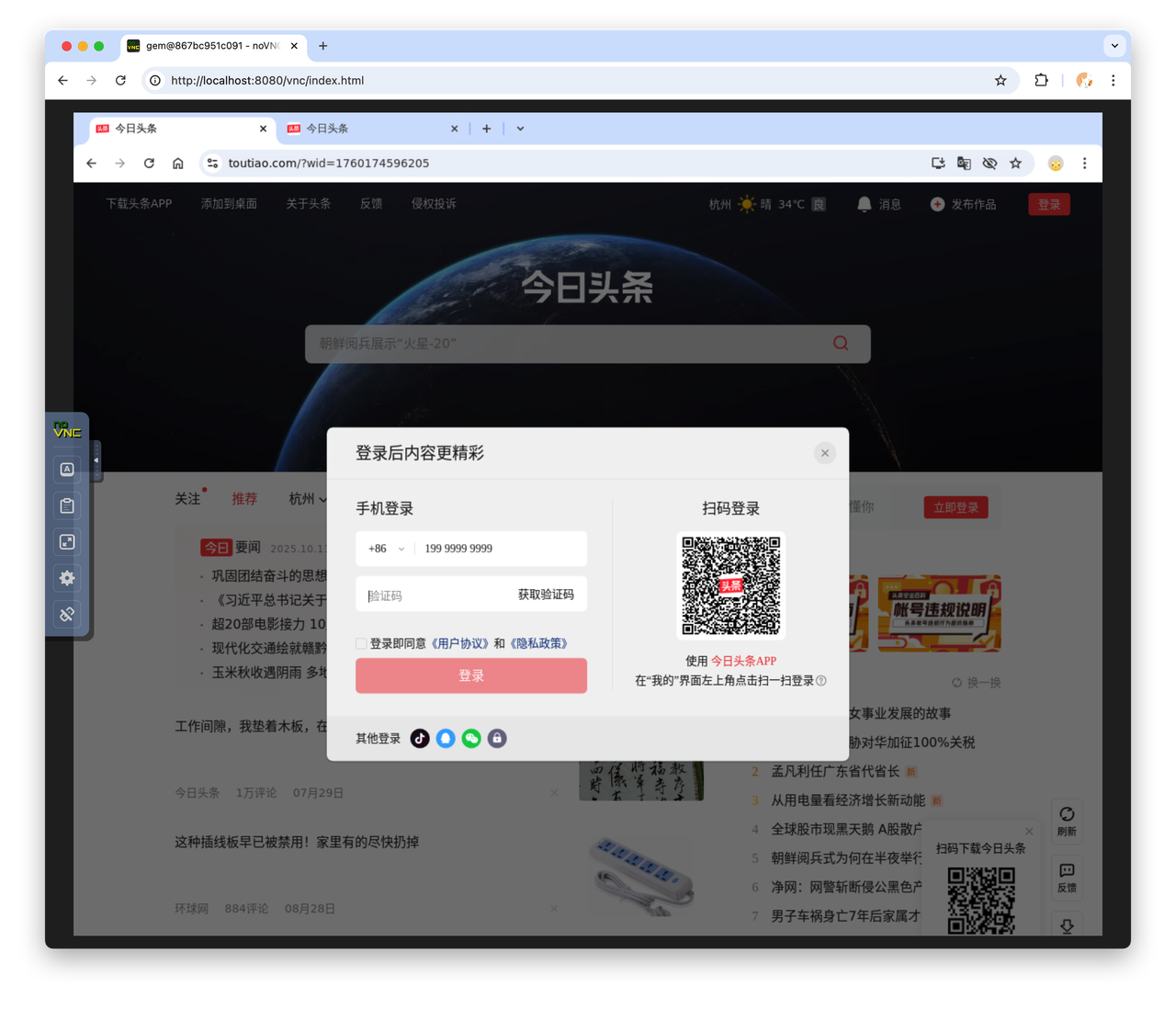
When Browser Use encounters a login scenario, human takeover is usually required, and an interactive browser interface must be provided. There are currently two approaches:
- VNC takeover: AIO Sandbox provides the
/vnc/index.htmlpage for direct user interaction.
- The frontend connects through CDP and redraws the full browser interface in real time on Canvas (Playground); we have packaged the frontend part as a component @agent-infra/browser-ui. Below, the left side is the actual browser, and the right side is the browser-ui projection:

The differences between the two takeover methods are roughly as follows:
| Comparison dimension | VNC | Canvas + CDP (Chrome DevTools Protocol) |
|---|---|---|
| Technical principle | Remote desktop protocol, transmitting pixels of the entire screen | Controls the browser through CDP, renders content with Canvas |
| Transport protocol | RFB (Remote Framebuffer) | WebSocket + CDP |
| Transferred content | Full browser view (with Tabs) | Only the current browser page content (no Tabs by default; can be implemented separately) |
| Bandwidth usage | High (10-50 Mbps) | Low (1-5 Mbps) |
| Latency | Relatively high (50-200ms) | Relatively low (10-50ms) |
| Stability | Less prone to disconnection | Prone to disconnection; requires adding heartbeat with CDP manually to avoid disconnections |
| CPU usage | High (desktop encoding) | Low (browser rendering only) |
| Memory usage | High (requires a full desktop environment) | Low (browser process only) |
| Control scope | Entire browser | Only pages inside the browser |
| Automation capability | Basic (mouse/keyboard simulation) | Powerful (DOM operations, network interception, JS injection, etc.) |
| Multi-window support | ✅ Supported | ❌ Only a single browser window |
| File operations | ✅ Can operate local files | ❌ Restricted by the browser sandbox |
Command-Line Interpreter
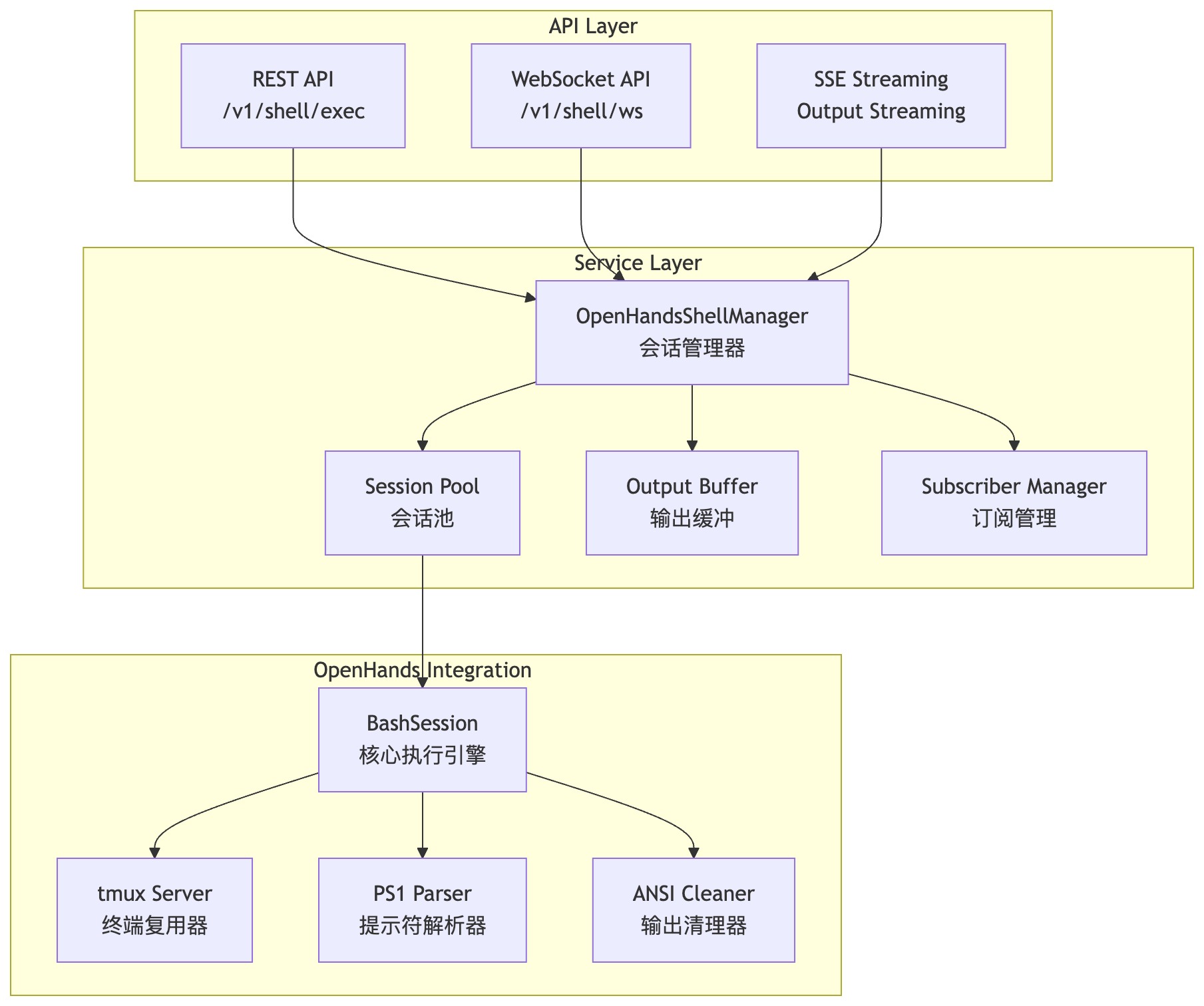
For Coding Agents, most tasks can be completed through the command line. When designing the Shell module, OpenHands’ CmdRunAction is used as the execution engine, combined with tmux to implement multi-session execution capability.
File Operations
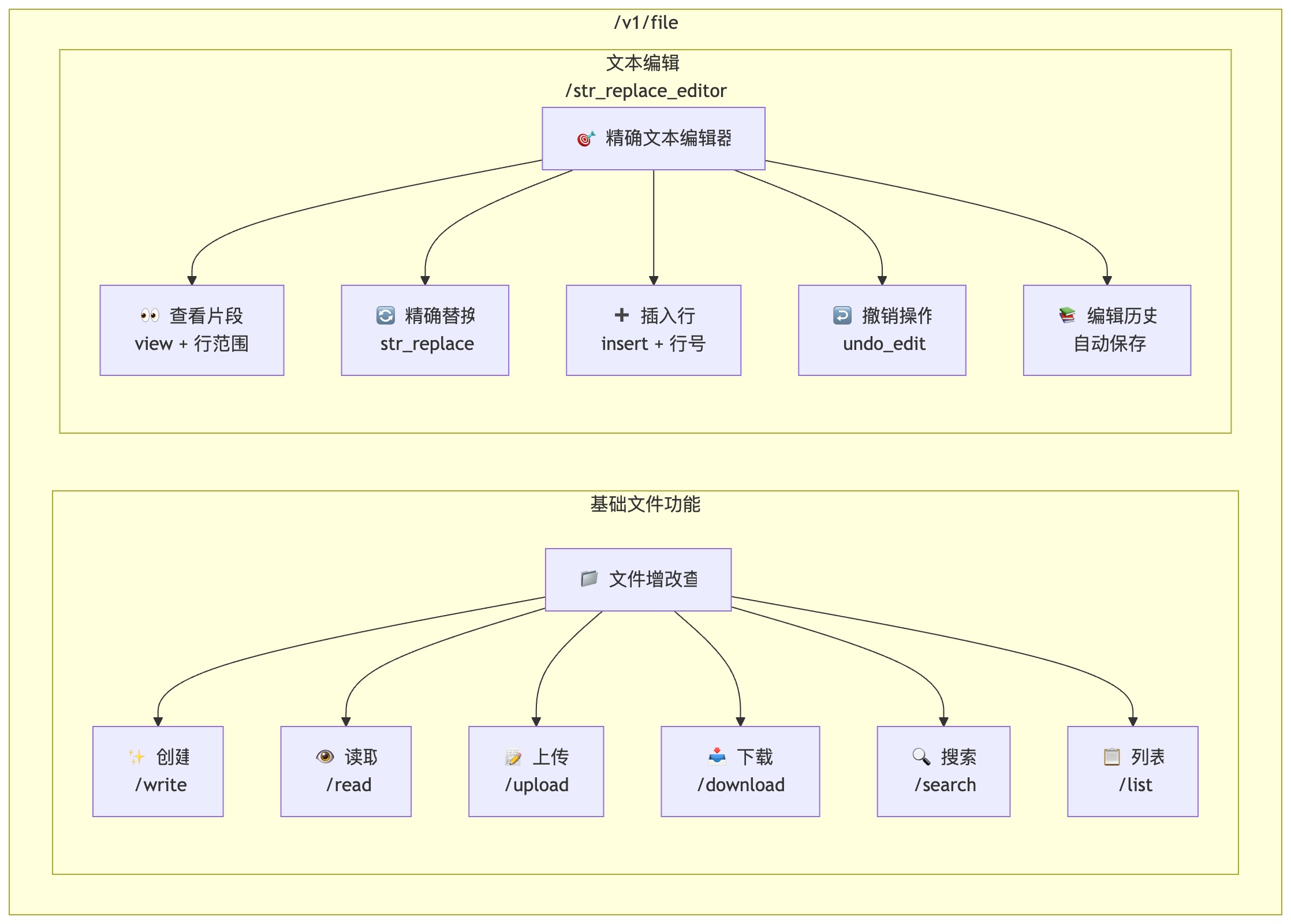
Only two tools are needed for file/code editing:
-
File create/update/read: Encapsulates basic I/O such as file read/write, directory listing, creation, upload, and download, combined with path validation and permission control to cover common file operation scenarios.
-
Text editor: Implements a model-oriented fine-grained editing tool str_replace_editor, supporting:
-
view(view file or directory, including line ranges) -
str_replace(exact string replacement) -
insert(insert by line, supported in older versions) -
undo_edit(undo)
-
Code Execution
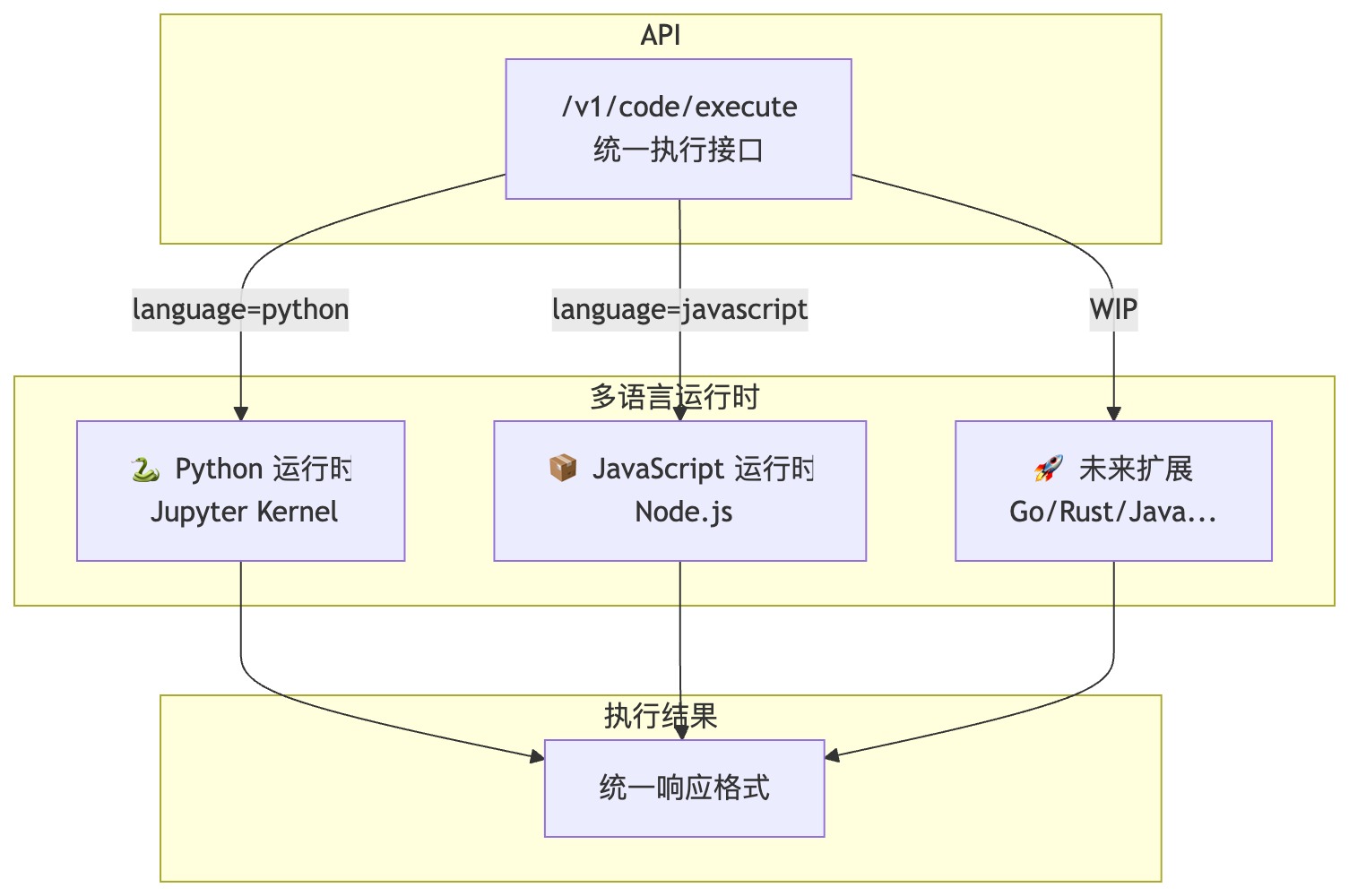
Balancing language coverage and image size, the Python 3.10/3.11/3.12 and Node.js 22 runtimes from Sandbox Fusion are used, providing an integrated secure isolation environment for code execution.
MCP Servers Aggregator
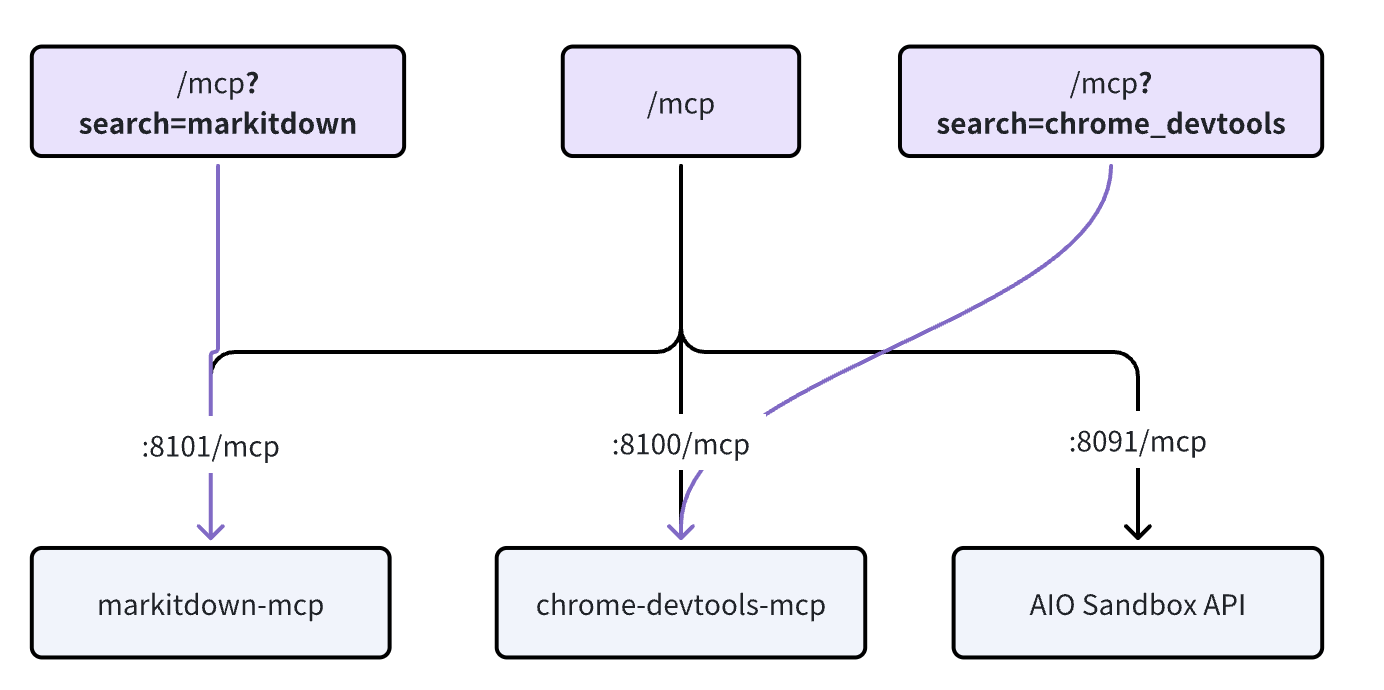
A unified /mcp entry point aggregates multiple MCP Servers (for example, chrome-devtools-mcp), supports parameter-level filtering, and can add prefixes to tool names (namespacing).
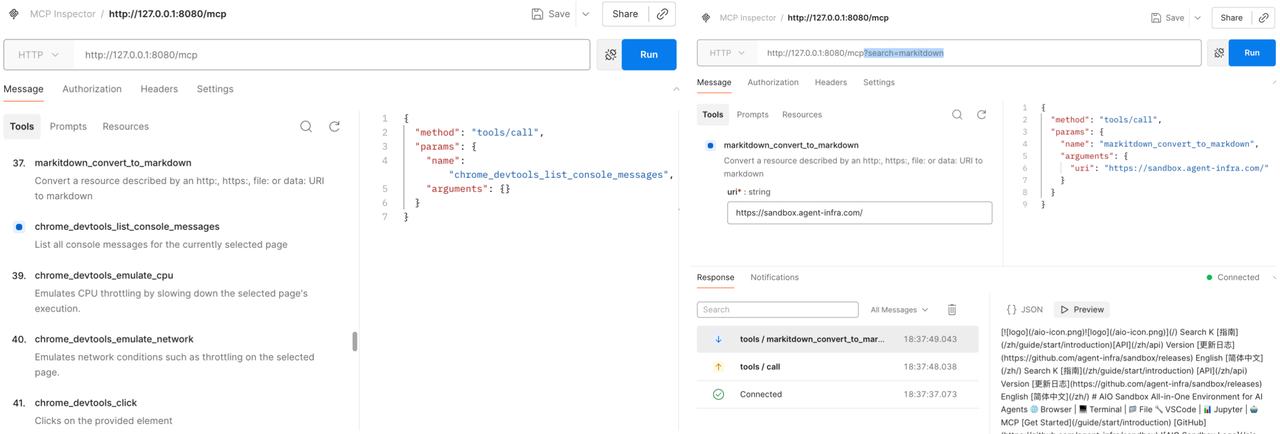
 MCP Servers are filtered by
 search; in the future, multidimensional filtering such as tags (tags) and categories (category) will be added to reduce redundant calls and lower model token overhead.
Proxy
In an Agent sandbox, two types of scenarios are generally involved, corresponding to forward and reverse proxies:
-
Forward proxy: Browser Use Agents can access private/global networks
-
Reverse proxy: Services developed by Coding Agents inside the sandbox are exposed externally for users to preview
Forward Proxy
TinyProxy is used as the proxy server to bypass geographic restrictions, access restricted content, or provide secure access within enterprise intranets.
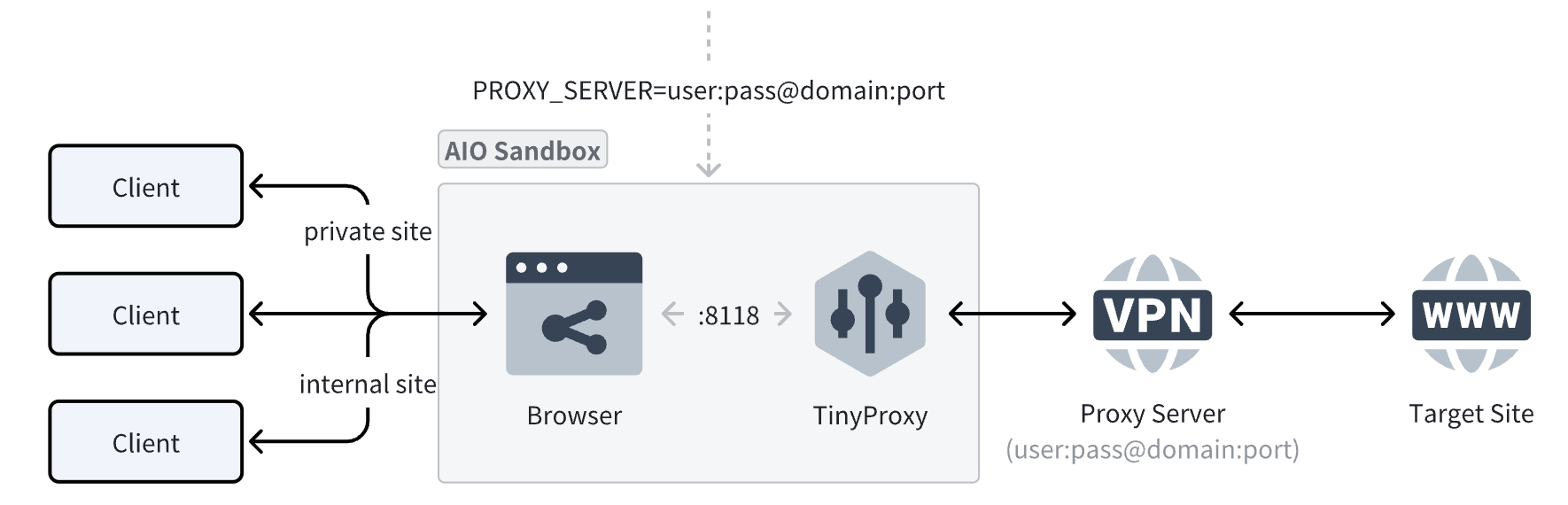
Why introduce the TinyProxy proxy server when Chrome already has --proxy-server for specifying a proxy?
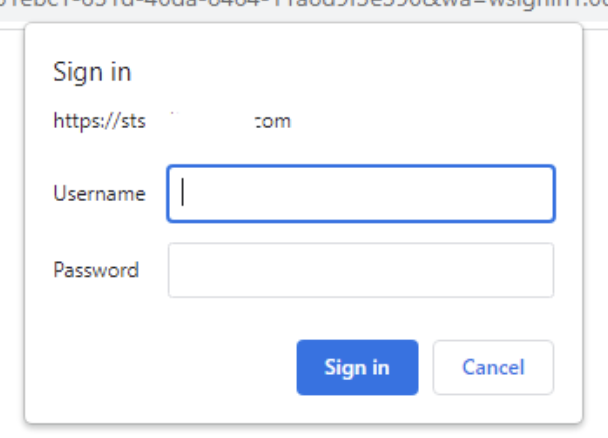
The official Chromium documentation states that any username/password embedded in proxy settings (for example, http://user:pass@host:port) will not be used. Authentication must go through a separate challenge dialog, which affects the entire Browser Use workflow (as shown below):
Reverse Proxy
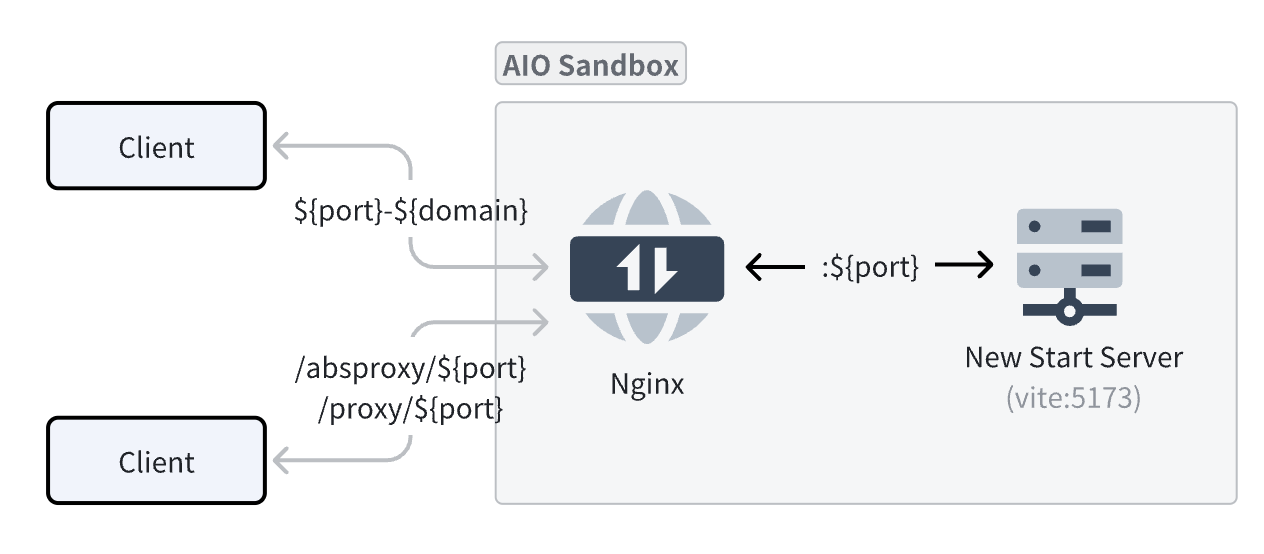 Two methods are provided for accessing service ports inside the Sandbox:
-
subdomain wildcard domain forwarding (recommended): Any domain name matching the
${port}-${domain}format will be forwarded to the corresponding port inside the sandbox.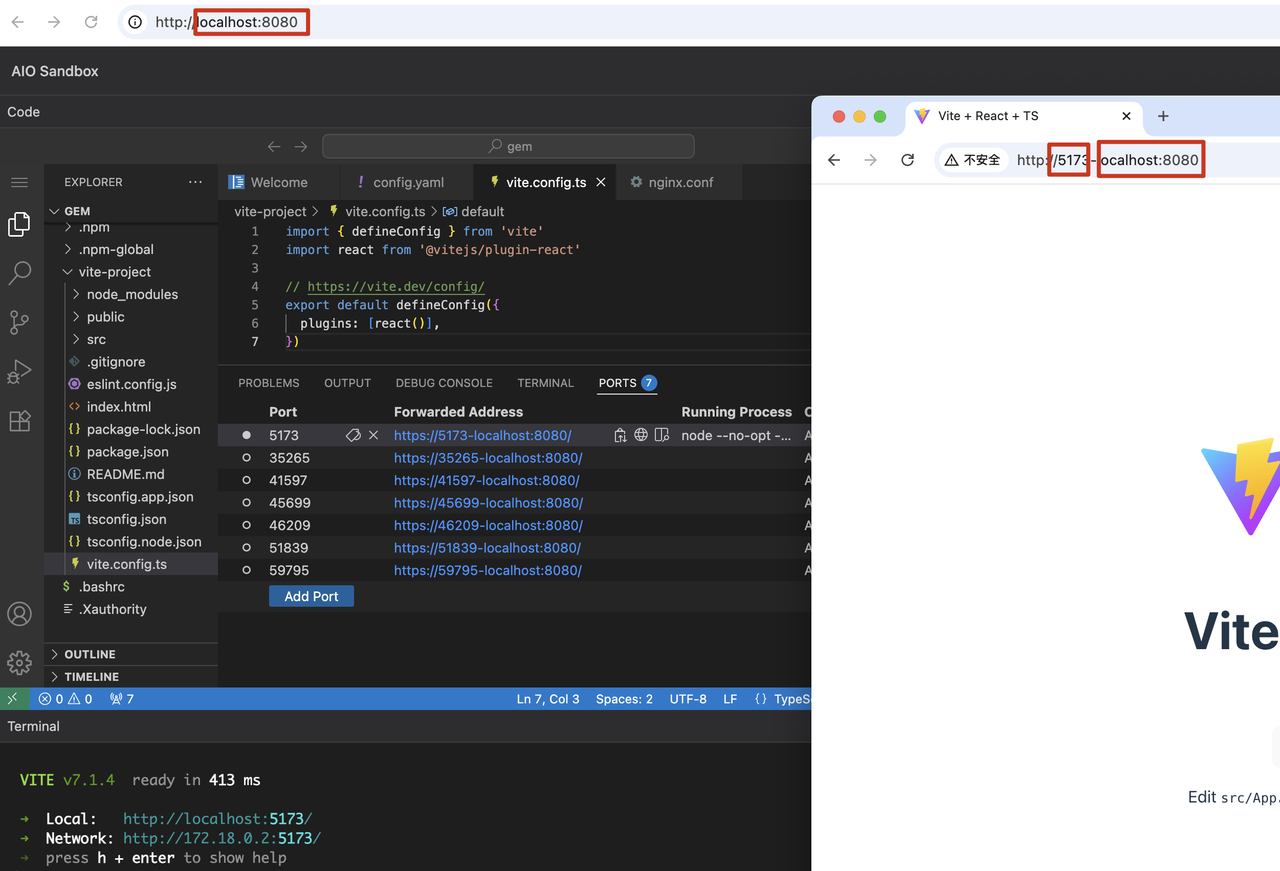
-
subpath forwarding: This runs into many problems: for route-sensitive services (such as frontend projects), resources may fail to match and return 404 because of the extra
/proxy|absproxy/${端口}path.
Authentication
Agents generate user data inside the sandbox. To implement global unified authentication for AIO Sandbox without intruding on or modifying any existing business route configuration, and without increasing the cognitive burden of future route configuration extensions, an internal Nginx gateway-layer “asymmetric encryption + JWT” reverse proxy architecture is designed for authentication:

How to Enable (One-Time Configuration)
- Generate a key pair
openssl genrsa -out private_key.pem 2048
openssl rsa -in private_key.pem -pubout -out public_key.pem
echo "密钥对生成完毕!"- Start the service (enable authentication with the public key), using the environment variable
JWT_PUBLIC_KEY
export JWT_PUBLIC_KEY=$(cat public_key.pem | base64)
JWT_PUBLIC_KEY="${JWT_PUBLIC_KEY}"
Issue a JWT
The business service uses the private key to generate a JWT valid for 1 hour. The following is a simplified script to generate a JWT; in practice, the business backend should use a mature JWT library:
# 这是一个简化的脚本来生成JWT,实际中业务后端应使用成熟的 JWT 库 base64url_encode() { openssl base64 -e -A | tr '+/' '-_' | tr -d '='; }
header='{"alg":"RS256","typ":"JWT"}'
exp_time=$(($(date +%s) + 3600))
payload="{\"exp\":${exp_time}}"
to_be_signed="$(echo -n "$header" | base64url_encode).$(echo -n "$payload" | base64url_encode)"
signature=$(echo -n "$to_be_signed" | openssl dgst -sha256 -sign private_key.pem | base64url_encode)
jwt="${to_be_signed}.${signature}"echo "JWT已生成: ${jwt}"
Usage
-
Header authentication
curl --silent -X GET "http://localhost:8080/v1/sandbox" \ -H "Authorization: Bearer ${jwt}" -
Short-lived ticket authentication example (using VNC page access as an example): direct access cannot complete authentication by adding a Header, so access can only be initiated with a
?ticket=ticket as a query parameter.- Use the JWT to obtain a ticket from the common endpoint (valid for 30s by default; configure
TICKET_TTL_SECONDSenvironment variable to increase it)
echo "使用JWT换取通用的一次性票据..." ticket_response=$(curl --silent -X POST "http://localhost:8080/tickets" \ -H "Authorization: Bearer ${jwt}") ticket=$(echo "$ticket_response" | jq -r .ticket) expires=$(echo "$ticket_response" | jq -r .expires_in) echo "获取成功!票据: ${ticket}, 有效期: ${expires}秒"- The client builds and uses the VNC URL**:** Now, you can use the obtained
${ticket}variable to build the VNC URL and initiate access.
# Bash脚本模拟客户端拼接URL vnc_url="http://localhost:8080/vnc/index.html?ticket=${ticket}&path=websockify%3Fticket%3D${ticket}" echo "客户端构建的最终URL: ${vnc_url}" # 模拟访问 (实际应在浏览器中进行) # curl -I "${vnc_url}" - Use the JWT to obtain a ticket from the common endpoint (valid for 30s by default; configure
Extensions and Ecosystem
Custom Images
In AIO, service processes (supervisord) and service routes (Nginx) are automatically mounted according to convention-based directories.
-
Service process directory:
/opt/gem/supervisord/*.conf -
Route directory:
/opt/gem/nginx/*.conf
If you customize services and routes based on the AIO image, refer to the following image code:
FROM enterprise-public-cn-beijing.cr.volces.com/vefaas-public/all-in-one-sandbox:latest

# ----------------------
# 安装额外系统依赖(若有)
# installed path: /usr/bin/*
# ----------------------
RUN set -eux; \
    apt-get update; \
    apt-get install -y --no-install-recommends \
        ${your_system_dep} \
        --no-install-recommends; \
    # clean up
    apt-get clean && \
    rm -rf /var/lib/apt/lists/*;

# ----------------------
# npm 安装(若有)
#
# ----------------------
RUN npm i -g ${your_npm_package}

# ----------------------
# python pip 安装(若有)
# installed path: /usr/local/bin/*
# ----------------------
RUN pip install ${your_python_package}

# 添加自定义 Server 服务
COPY ./supervisord.agent_server.conf /opt/tiger/run/supervisord/agent_server.conf
# 绑定 Nginx 路由
COPY ./nginx.agent_server.conf /opt/gem/nginx/nginx.agent_server.conf

# # 若不需要 AIO 里的服务,可进行删除,例如 Code Server
# ## 删除 Code Server 进程和路由
# RUN rm -rf /opt/gem/supervisord/supervisord.code_server.conf
# ## 删除 Code Server 路由
# RUN rm -rf /opt/gem/nginx/code_server.conf
SDK Integration
Using fern, the API documentation in AIO Sandbox is directly converted into Python / Go / Node.js SDKs. Taking Python as an example, just a few lines of code connect the core capabilities in AIO Sandbox:
from agent_sandbox import Sandbox

client = Sandbox(base_url="http://localhost:8080")

# Execute Shell
shell_res = client.shell.exec_command(command="ls -la")
print(shell_res.data.output) # /home/gem

# Browser Screenshot
screenshot = client.browser.screenshot()
print(screenshot)

# Get Browser CDP
browser_info = client.browser.get_browser_info()
cdp_url = browser_info.data.cdp_url # ws://

# Read File
file_res = client.file.read_file(file="/home/gem/.bashrc")
print(file_res.data.content)
For more usage examples, see: agent-infra/sandbox#examples
browser-use
Only 4 lines of code are needed to integrate with the community browser-use:
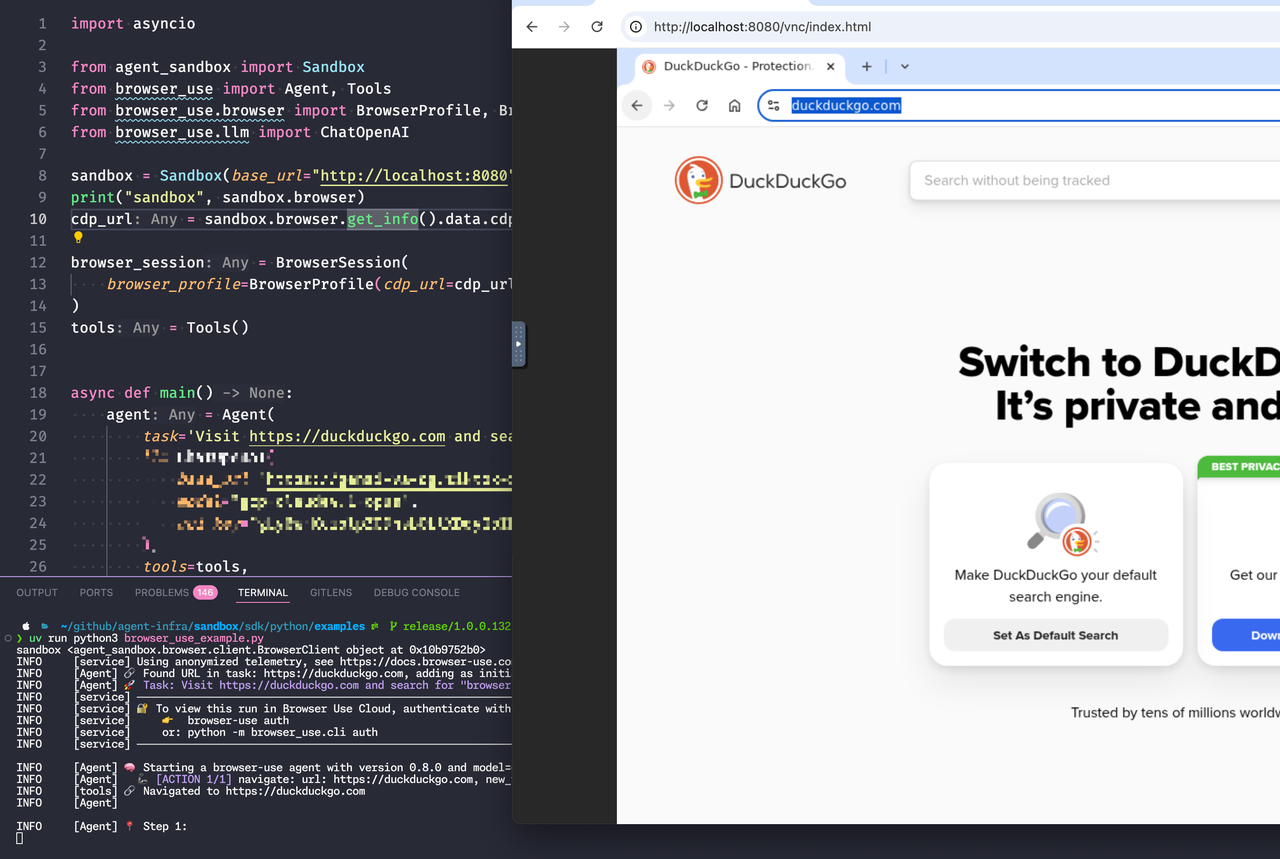
Full code: browser-use#main.py
LangGraph-DeepAgents
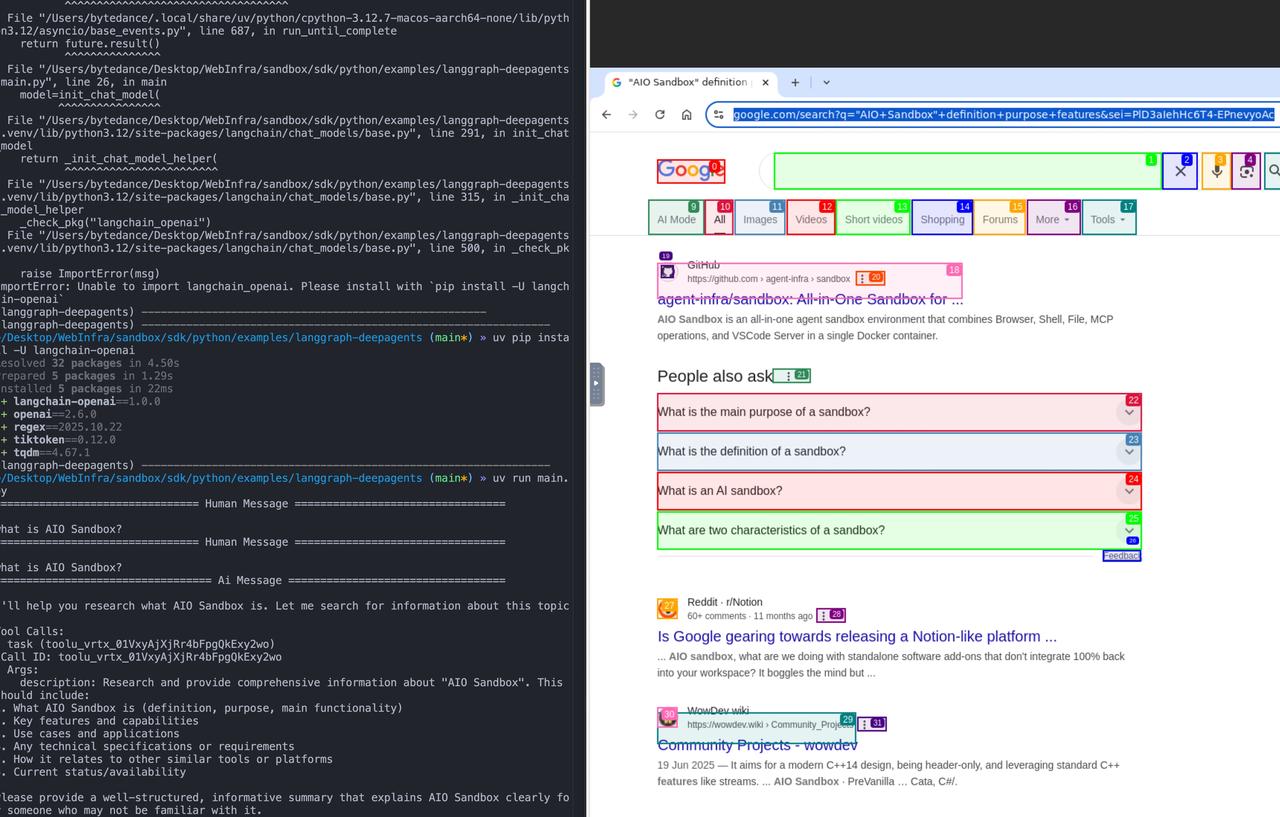
Full code: langgraph-deepagents#main.py
Custom Toolsets
You can use the API / SDK to compose the high-level toolsets required by Agents, for example, link_reader returns page content for a URL address:
from openai import OpenAI
from agent_sandbox import Sandbox
import json

client = OpenAI(
    api_key="your_api_key",
)
sandbox = Sandbox(base_url="http://localhost:8080")

tools = [{
    "type": "function",
    "function": {
        "name": "link_reader",
        "description": "渲染并读取网页,返回标题、正文与最终URL(基于CDP)。",
        "parameters": {
            "type": "object",
            "properties": {
                "url": {"type": "string", "format": "uri"},
                "timeout_ms": {"type": "integer", "default": 30000}
            },
            "required": ["url"]
        }
    }
}]

async def link_reader(url: str, timeout_ms: int = 30_000) -> dict:
    cdp_url = sandbox.browser.get_browser_info().cdp_url
    async with async_playwright() as p:
        browser = await p.chromium.connect_over_cdp(cdp_url)
        try:
            page = await browser.new_page()
            await page.goto(url, wait_until="networkidle", timeout=timeout_ms)
            title = await page.title()
            text = await page.evaluate("document.body.innerText || ''")
            return {"final_url": page.url, "title": title, "text": text[:8000]}
        finally:
            await browser.close()
Deployment
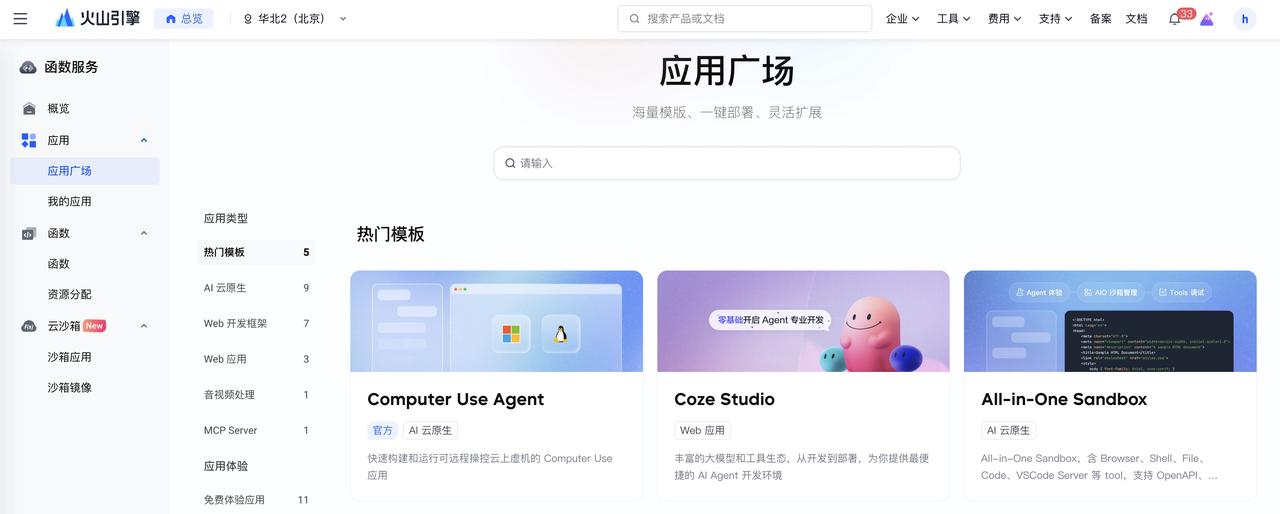
The current best public-cloud deployment form is Function Compute, based on Sandbox’s specified-instance access capability: One-click deployment of the All-in-One Sandbox app — Function Service - Volcano Engine
Summary and Outlook
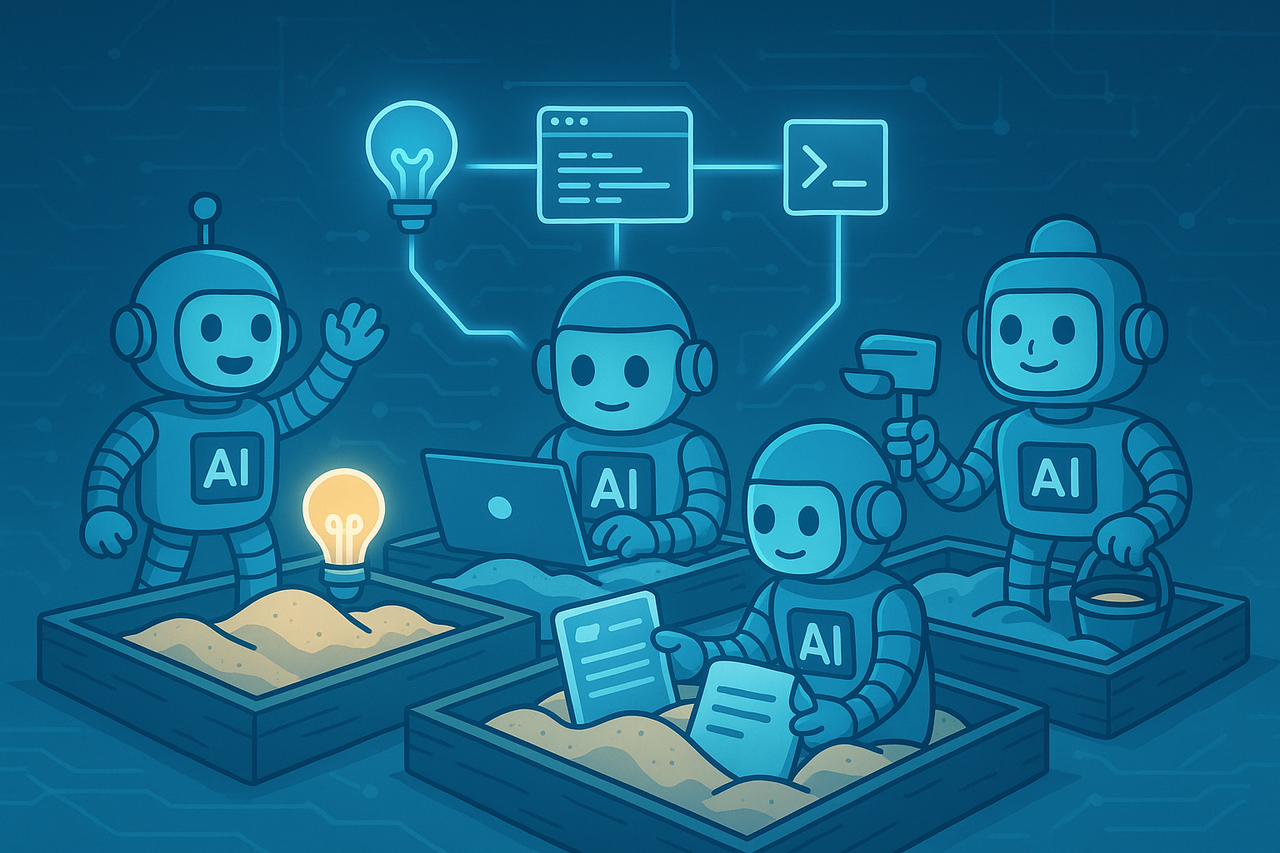
AIO Sandbox provides an integrated and customizable base environment (Agent Env), enabling Agents to complete diverse tasks such as browsing, executing code, running commands, and operating files within the same environment, while supporting dedicated domain sandboxes customized for different Agents. This sandbox system will continue to evolve and expand as the intelligence ceiling of Agents rises and developer creativity is unleashed. Going forward, we will continue refining stability, observability, and ecosystem integration, continuously improving the evaluation system and best practices, and driving AIO Sandbox toward robust deployment and efficient operation in more large-scale, demanding Agent application scenarios.
Appendix
Glossary
| Term | Explanation |
|---|---|
| Agent | In the LLM context, an AI Agent is an intelligent entity that can autonomously understand intent, plan decisions, and execute complex tasks. An Agent is not an upgraded version of ChatGPT: it not only tells you “how to do it,” but also helps you do it. If Copilot is the co-pilot, then Agent is the pilot. Similar to the human process of “doing things,” the core functions of an Agent can be summarized as a three-step loop: Perception, Planning, and Action. |
| Copilot | Copilot refers to an AI-based assistant tool, typically integrated with specific software or applications, designed to help users improve productivity. Copilot systems analyze user behavior, inputs, data, and history to provide real-time suggestions, automate tasks, or enhance functionality, helping users make decisions or simplify operations. |
| AIO | All-In-One, meaning multiple capabilities (Browser, Code Execution, Shell, File, visual takeover, authentication, proxy, etc.) are integrated within a singleimage/instance, reducing cross-environment switching and data movement. |
| Sandbox | A controlled and isolated execution environment. It is used to run browsers, code, or command lines, control resources and permissions, and reduce impact and risk to the host system. |
| CDP | CDP (Chrome Devtools Protocol) is a protocol for communicating with Chrome or Chromium browsers. It allows developers to interact with the browser by sending commands and receiving events for debugging, analysis, and browser automation. CDP provides a set of APIs (Application Programming Interface) that define browser behaviors and capabilities. |
| VNC | VNC is a family of “remote desktop sharing/control” technologies and tools based on the RFB (Remote Framebuffer) protocol. The core idea is to encode the remote host’s screen framebuffer (pixels) and transmit it over the network to the client, while replaying the client’s keyboard and mouse events on the remote host to enable cross-platform remote operation. |
| MCP | Model Context Protocol* (Model Context Protocol)* is an open protocol that standardizes how applications provide context to LLMs. MCP can be thought of as the USB-C port for AI applications. Just as USB-C provides a standard way for your devices to connect to various peripherals and accessories, MCP provides a standard way for your AI models to connect to different data sources and tools. |
| Browser Use | A general term for Agents completing tasks such as search, login, clicking, form filling, and downloading through a browser. It can use either CDP instructions or GUI visual operations. |
| OpenHands | OpenHands is an open-source AI Software Developer Agent Platform used to train, evaluate, and run large language models (LLMs) capable of “autonomous programming” in real development environments. It was initially released under the name OpenDevin and later renamed OpenHands, maintained by the All Hands AI community. |
References
- UI-TARS-2 Technical Report: Advancing GUI Agent with Multi-Turn Reinforcement Learning
- AIO Sandbox: All-in-One Sandbox for AI Agents & Developers
- Agentic AI基础设施实践经验系列(二):专用沙盒环境的必要性与实践方案
- Writing effective tools for AI agents—using AI agents
- Unifying the Computer Use Action Space