Based on the UI-TARS multimodal vision model, combined with MCP (Model Context Protocol), this article explores building a next-generation cross-platform autonomous perception GUI Agent system. Consider this a starting point for discussion, and let’s explore the technology, scenarios, and future of GUI Agents together!
For the UI-TARS project, see http://github.com/bytedance/UI-TARS-desktop
Glossary
| Term | Explanation |
|---|---|
| GUI Agent | A GUI Agent (Graphical User Interface Agent) is a type of AI system driven by multimodal vision models. It can automatically reason about and execute tasks that interact with graphical interfaces, such as PCs, the Web, mobile apps, and more. It can simulate human user operations, including clicking, typing, dragging, reading interface information, and so on, thereby automatically completing tasks proposed by users. |
| UI-TARS | UI-TARS is a self-learning GUI Agent open-sourced by ByteDance. It is a next-generation native GUI agent model designed to interact seamlessly with graphical user interfaces (GUIs) using human-like perception, reasoning, and operation capabilities. Unlike traditional modular frameworks, UI-TARS integrates all key components—perception, reasoning, reflection, and memory—into a single Vision-Language Model (VLM), enabling end-to-end task automation without predefined workflows or manual rules. For details, see ByteDance’s Operator beats OpenAI to the punch? Free and open source, users say: saved $200! |
| Computer Use | Computer Use is a capability first proposed by Anthropic based on the Claude 3.5 Sonnet model. It allows AI to interact with a virtual machine desktop environment and perform operating-system-level tasks. |
| MCP | Model Context Protocol* (Model Context Protocol)* is an open protocol that standardizes how applications provide context to LLMs. You can think of MCP as a USB-C port for AI applications. Just as USB-C provides a standard way for your devices to connect to various peripherals and accessories, MCP provides a standard way for your AI models to connect to different data sources and tools. For details, see Practical Development of AI Agent Applications Based on MCP |
| UI Agents | UI Agents technology uses large model technologies (VLM / LLM) to enable agents to automatically operate phones or computers, simulating human behavior to complete specified tasks. |
| VLM | Vision Language Models (Vision-Language Models), refers to models that can process both visual and language modalities at the same time. |
| MLLM | MLLM, Multimodal Large Language Model (Multimodal Large Language Model) uses powerful large language models (LLMs) as the “brain” to perform multimodal tasks. MLLMs exhibit astonishing emergent capabilities, such as writing stories based on images and performing mathematical reasoning without OCR. |
| SSE | Server-sent Event* (SSE, Server-Sent Events)* is a technology based on HTTP connections that allows servers to push data to clients in real time and in one direction. For scenarios where the server only needs to push data to the client and does not need to receive data from the client, it is a simple and efficient alternative to WebSockets. |
| VNC | VNC (Virtual Network Computing) is a graphical desktop sharing system that uses the Remote Frame Buffer protocol (RFB) to remotely control another computer. It transmits keyboard and mouse input from one computer to another over the network and relays graphical screen updates. |
| RPA | Robotic Process Automation is a category of process automation software tools that automate rule-based routine operations by using and understanding existing enterprise applications through the user interface. |
| HITL | Human-in-the-loop (HITL) refers to models that require interaction with humans. Human judgment is integrated into the automation process, thereby enhancing the capabilities of AI systems. |
Background
Why do we need GUI Agents?
What is the essential way humans use electronic devices?
- Visual perception: observing and understanding the content on the screen through the eyes
- Finger operation: interacting with interfaces through gestures such as clicking and swiping
- Goal orientation: planning a series of operation steps based on task goals
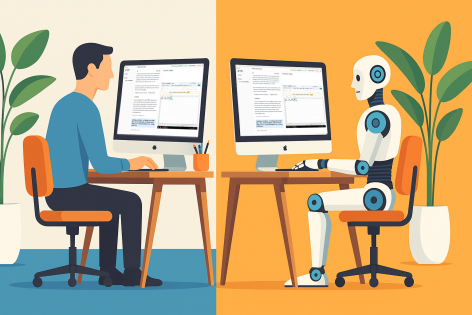
Based on first principles, GUI Agents simulate the way humans use electronic devices, enabling truly native end-to-end general automation.
Demo
| Device Used | Instruction | Screen Recording |
|---|---|---|
| Local computer (Computer Use) | Please help me open the autosave feature of VS Code and delay AutoSave operations for 500 milliseconds in the VSCode setting | Link |
| Local browser (Browser Use) | Could you help me check the latest open issue of the UI-TARS-Desktop project on Github? | Link |
| Remote virtual machine (Remote Computer) | Recognize the receipt content and organize it into Excel | Link |
| Remote browser (Remote Browser) | Order a Big Mac meal from McDonald’s and deliver it to Dinghao | Link |
| TV (TV Use) | Play episode 5 of The Lychee Road | Link |
For more showcases, see: https://seed-tars.com/showcase
Detailed Design
Overall Overview
To build a GUI Agent system, three core components are needed:
-
VLM (vision model): Responsible for understanding screen content and user instructions. Based on the user instruction + screenshot, it generates a natural language command (NL Command).
-
Agent Operator: Based on the user instruction, it calls the model and invokes device capabilities through the MCP Client. Essentially, it is a workflow that decouples the logic of how the LLM obtains different contexts through the MCP architecture.
-
Devices (external devices): Exposed as MCP Services packages. They can be PCs, mobile devices, virtual machines, Raspberry Pis, and so on. As long as they are electronic devices, they are peripherals and can be integrated into the GUI Agent system.
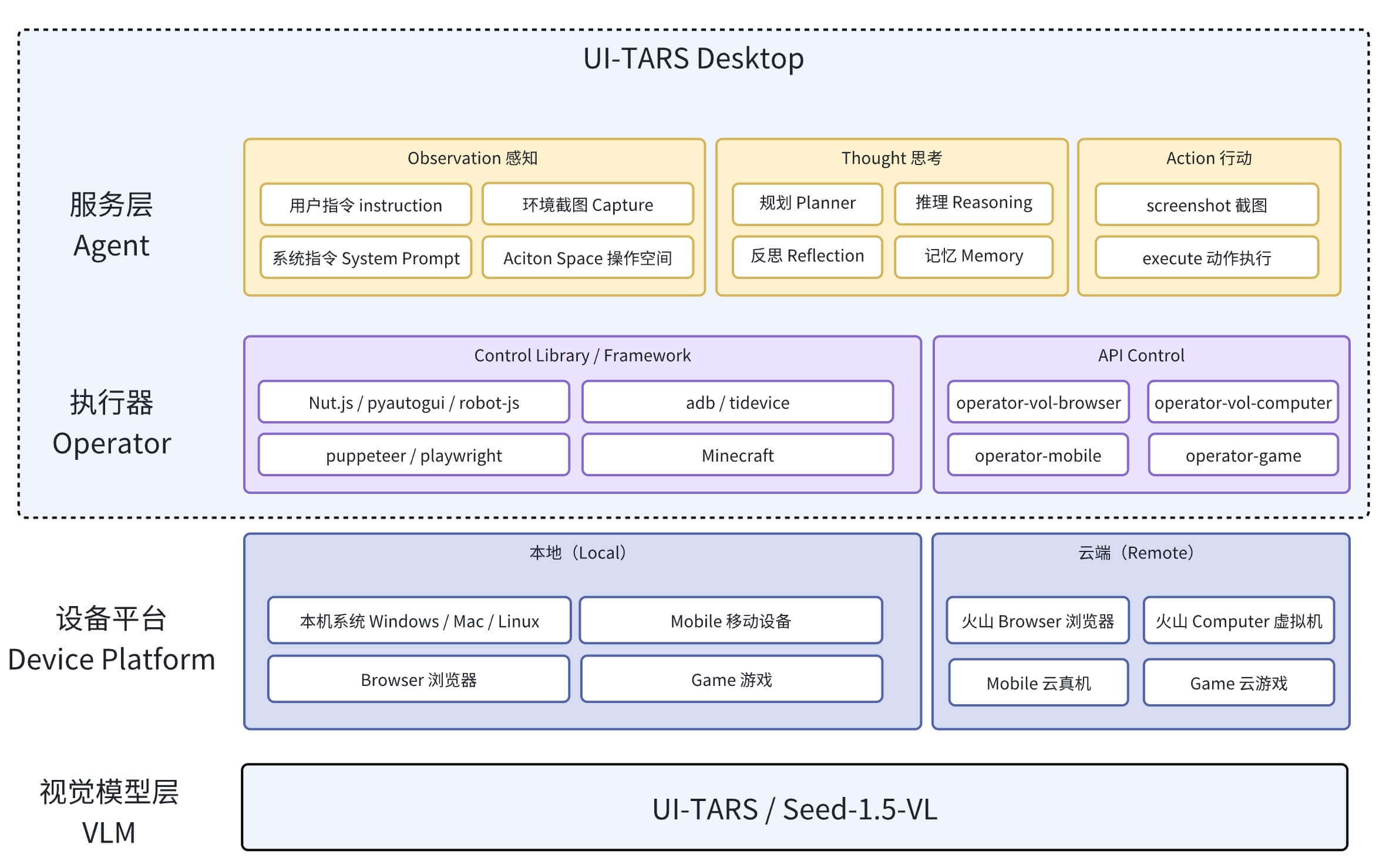
Process Flow
The core GUI Agent process can roughly be divided into:
-
Task perception: The system receives user instructions through natural language or screenshots, uses a multimodal model to parse them, and outputs an NLCommand (for example:
Action: click(start_box='(529,46)')). -
Coordinate mapping: Convert the pixel coordinates perceived by the model into screen coordinates.
-
Instruction conversion: Convert the parsed NLCommand into an executable Command. This involves converting the coordinate system from image coordinates to screen coordinates, preparing for subsequent execution.
-
Command execution: Invoke MCP Services to execute the converted command.

Prerequisites
Agent Logic
At the Agent layer, a GUI Agent is mainly a loop. It pushes screenshots, model outputs, Actions, and so on to the client according to task execution status. Therefore, you only need to implement the following logic:
import { GUIAgent } from '@ui-tars/sdk';
import { NutJSOperator } from '@ui-tars/operator-nut-js';

const guiAgent = new GUIAgent({
  model: {
    baseURL: config.baseURL,
    apiKey: config.apiKey,
    model: config.model,
  },
  operator: new NutJSOperator(),
  onData: ({ data }) => {
    console.log(data)
  },
  onError: ({ data, error }) => {
    console.error(error, data);
  },
});

await guiAgent.run('send "hello world" to x.com');
The Operator can be replaced with any corresponding operation tool / framework, such as browser control (operator-browser), Android device control (operator-adb), and so on.
Task Perception (Multimodal Model)
This is provided by the UI-TARS model. A System Prompt is defined, and by passing in a “screenshot” and a “task instruction,” it returns an ++operation tuple (NLCommand)++ in natural language. The benefit of this is that it ++decouples++ different device operation instructions.
Taking the System Prompt provided by the PC MCP Server as an example:
You are a GUI agent. You are given a task and your action history, with screenshots. You need to perform the next action to complete the task.

## Output Format
```
Action_Summary: ...
Action: ...
```diff

## Action Space

click(start_box='[x1, y1, x2, y2]')
left_double(start_box='[x1, y1, x2, y2]')
right_single(start_box='[x1, y1, x2, y2]')
drag(start_box='[x1, y1, x2, y2]', end_box='[x3, y3, x4, y4]')
hotkey(key='')
type(content='') #If you want to submit your input, use "\n" at the end of `content`.
scroll(start_box='[x1, y1, x2, y2]', direction='down or up or right or left')
wait() #Sleep for 5s and take a screenshot to check for any changes.
finished()

## Note
- Use Chinese in `Action_Summary` part.

## User Instruction
{instruction}
Explanation of the model output fields:
-
Action_Summary: A natural language description of the operation, included across multi-step interactions. -
Action: A tuple in the form of操作名(参数).
Taking the task “open the Chrome browser” on the PC side as an example, the screenshot size is 2560 x 1440, and the model output is Action: left_double(start_box='(130,226)'):

Why does the System Prompt click use two coordinates
[x1, y1, x2, y2]instead of directly returning a single coordinate? Early UI-TARS multimodal models were not trained only for Computer Use scenarios. They were also trained for object detection, recognition and understanding, and generated corresponding boxes(x1, y1, x2, y2). For Computer Use scenarios, when x1=x2, it can be directly reused as the same point. When they are not equal, the center point(x1+x2)/2is used.
Coordinate Mapping
Still using the “open Chrome” example above: how is the image-relative coordinate (130,226) calculated into the final absolute screen coordinate (332,325)?
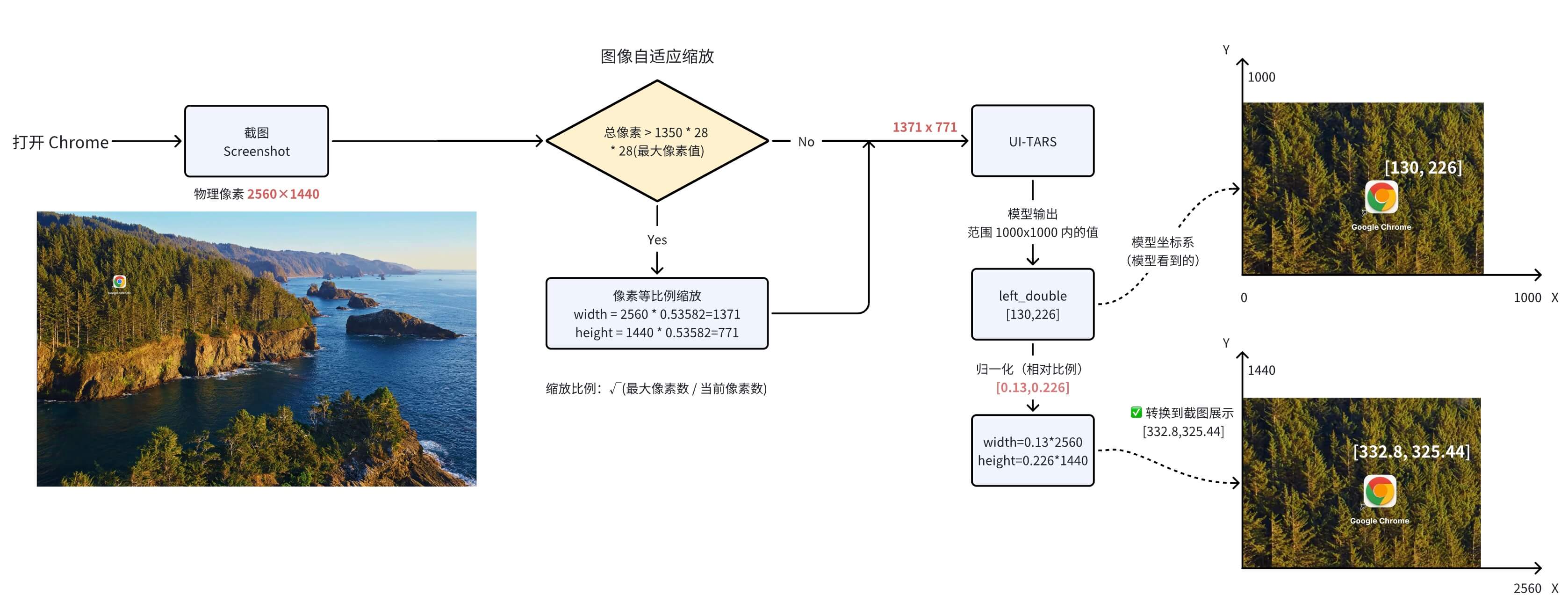
Parameter descriptions:
-
NLCommand (operation instruction): The operation and coordinates output by the model. During training and inference, the model outputs coordinates between 0 and 1000.
-
factor (scaling factor): Currently 1000 (because the coordinate system used to train the UI-TARS model is 1000x1000), corresponding to the coordinate value range output by the UI-TARS model.
-
width (screen width): 2560px
-
height (screen height): 1440px
Relative Coordinates and Absolute Coordinates
Positions on the screen are represented by X and Y Cartesian coordinates. The X coordinate starts at 0 on the left and increases to the right. Unlike in mathematics, the Y coordinate starts at 0 at the top and increases downward.
UI-TARS 模型的坐标系:
0,0       X increases -->
+---------------------------+
|                           | Y increases
| *(130, 226)               |     |
|   1000 x 1000 screen      |     |
|                           |     V
|                           |
|                           |
+---------------------------+ 999, 999

相对坐标:(0.02, 0.247)

映射到实际屏幕的坐标系上:
0,0       X increases -->
+---------------------------+
|                           | Y increases
| *(332, 325)               |     |
|   2560 x 1440 screen      |     |
|                           |     V
|                           |
|                           |
+---------------------------+ 1919, 1079
Instruction Conversion
Different devices have specific operation instructions (also known as action spaces). The Operator for each device converts the corresponding NLCommand into that device’s operation instructions.
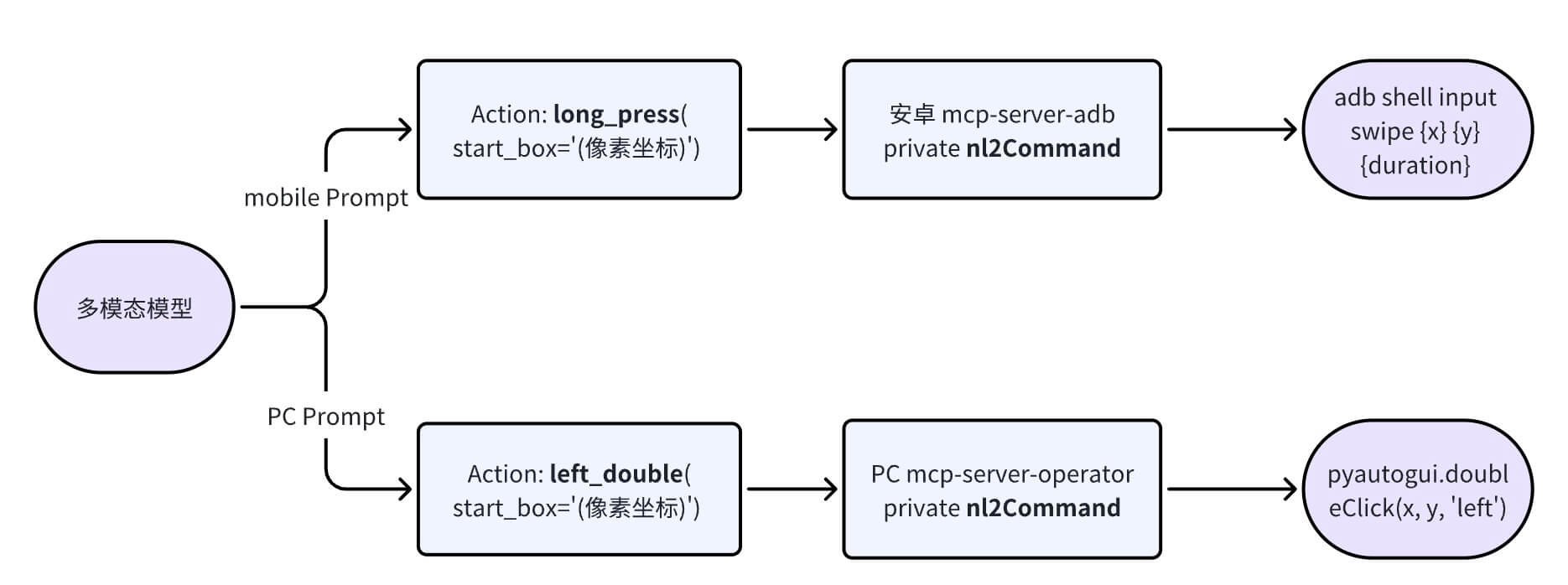
The currently supported action spaces are as follows:
# PC
PC = Enums[
    "hotkey",        # 键盘按键
    "type",          # 键盘输入文本
    "scroll",        # 鼠标滚动
    "drag",          # 拖拽
    "click",         # 左键点击
    "left_double",   # 左键双击
    "right_single",  # 右键点击
]

# Android 手机
Mobile = Enums[
    "click",         # 单击
    "scroll",        # 上下左右滑动
    "type",          # 输入
    "long_press",    # 长按
    "KEY_HOME",      # 返回 Home
    "KEY_APPSELECT", # APP 切换
    "KEY_BACK",      # 返回
]
Different device operations require the model to add corresponding training data so that it can better complete the corresponding tasks.
This step now has an SDK that can be used directly: @ui-tars/action-parser. See the test case for usage.
Command Execution
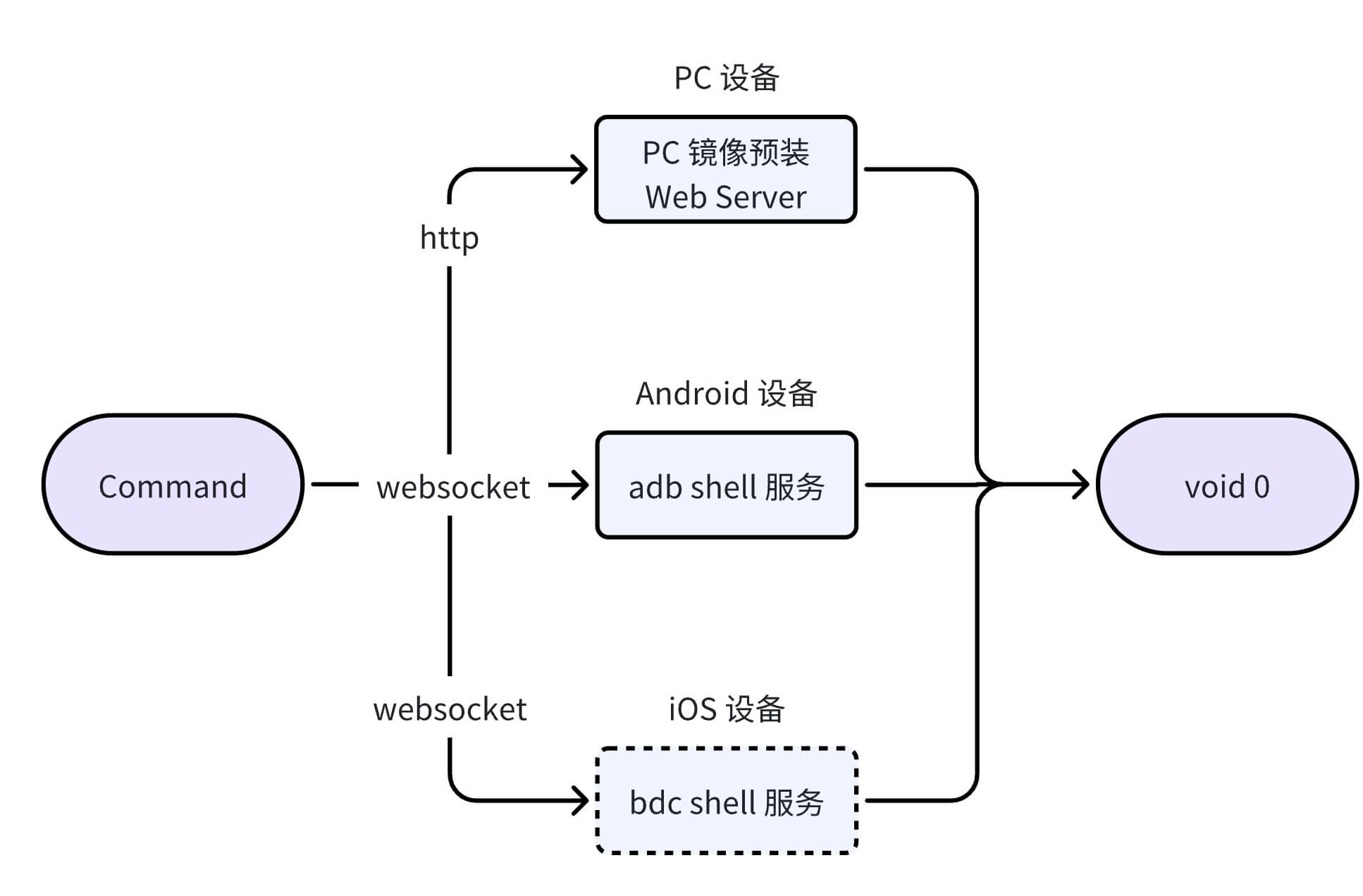
After obtaining the concrete command to execute, directly call the corresponding device MCP’s internal execCommand method. The flowchart for remote command execution on PC and mobile is as follows:
SDK (Developer Tools)
If implementing the above process feels cumbersome, you can use the UI-TARS SDK to implement it quickly:

MCP Servers
UI-TARS-related Operator tools can also be provided as MCP Servers:
- Browser Operator: enabled with
@agent-infra/mcp-server-browser --vision
Thoughts
The first thing that comes to mind when looking at the current vision-model-based GUI Agent solution is the evolution of Tesla FSD’s autonomous driving architecture.
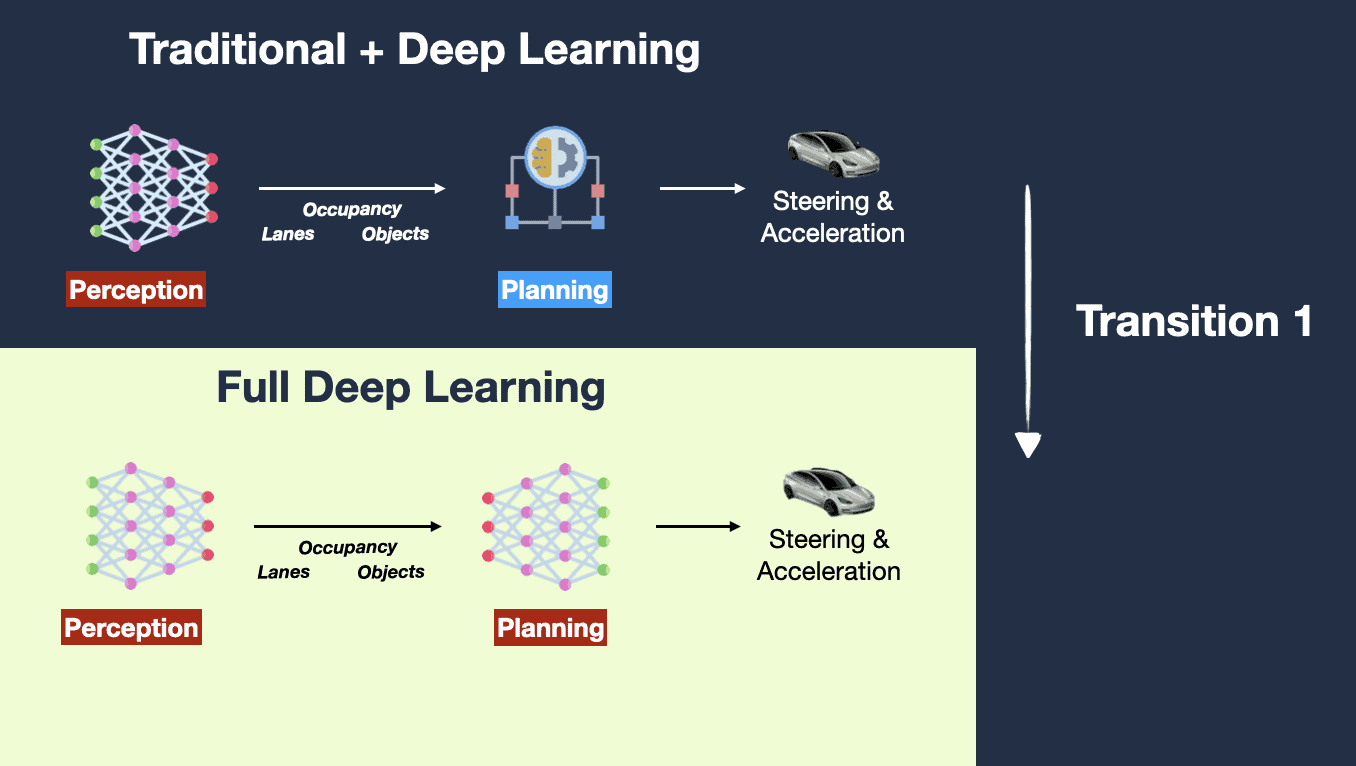
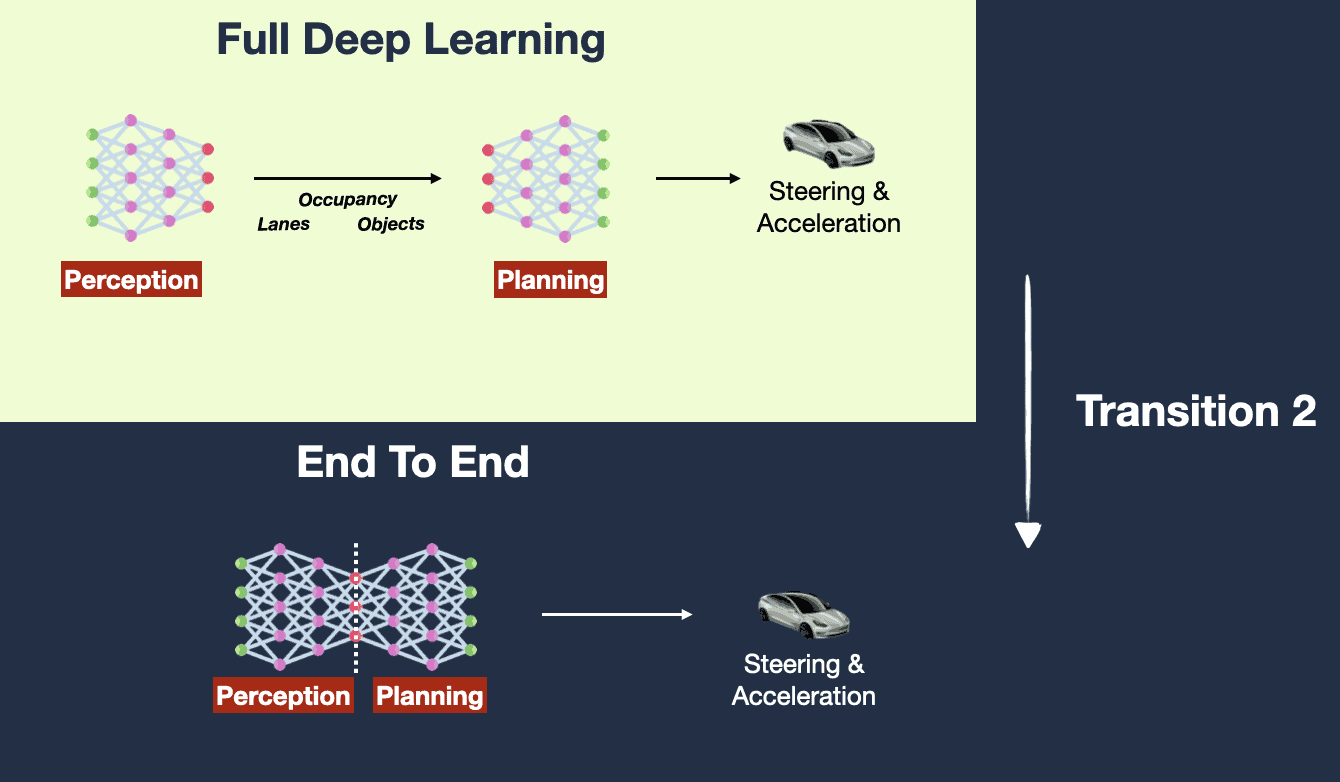
Premise: Humans can operate a system UI by seeing it with their eyes (vision), so AI can also achieve this through vision. Condition for success: unlimited data + large-scale compute, until all edge cases are solved.
The benefits of vision-based GUI Agents in terms of technical evolution are:
-
Training data is easy to prepare: Only “instructions” and “visual images” are needed, which greatly reduces the process of handling and cleaning model training data.
- If a “DOM structure” is added to the input, model training will fall into a data scarcity problem.
-
Cross-device integration is easy: Devices only need to provide two interfaces: screenshots and operations. There is no need to obtain the internal DOM structure, making integration across different devices much easier.
The drawbacks are:
-
Insufficient precision: Relying solely on vision loses the hierarchical structure of the UI interface (for example, windows stacked behind others, page content not currently in the viewport, etc.), which can lead to inaccurate operations.
-
High latency: Reasoning and recognition over instructions + screenshots require the model to have stronger reasoning capabilities. Meanwhile, when executing commands, the vision-based solution converts them into an instruction system (such as pyautogui) for operation, making the intermediate chain too long.
Application Scenarios
Agentic User Testing
Testing applications and products the way a human would operate them. For example, TestDriver is an asynchronous automated testing tool designed for GitHub. It can intelligently generate test cases and, by simulating real user behavior, provide broader test coverage than traditional selector-based frameworks. It supports functional testing for desktop applications, Chrome extensions, spelling and grammar, OAuth login, PDF generation, and more.

Computer Use can therefore be used for end-to-end functional verification, including checking layout integrity, element responsiveness, and visual consistency. The model can quickly identify interface issues, reducing the manual inspection workload. Inspection items include:
- Functional availability: through natural language (for example: “PRD document” + “frontend technical design document”),
- Visual consistency: whether it matches the “design mockup”, with conclusions obtained through CV image recognition + logs after model operations
- Accessibility: accessibility checks
Schedule Tasks
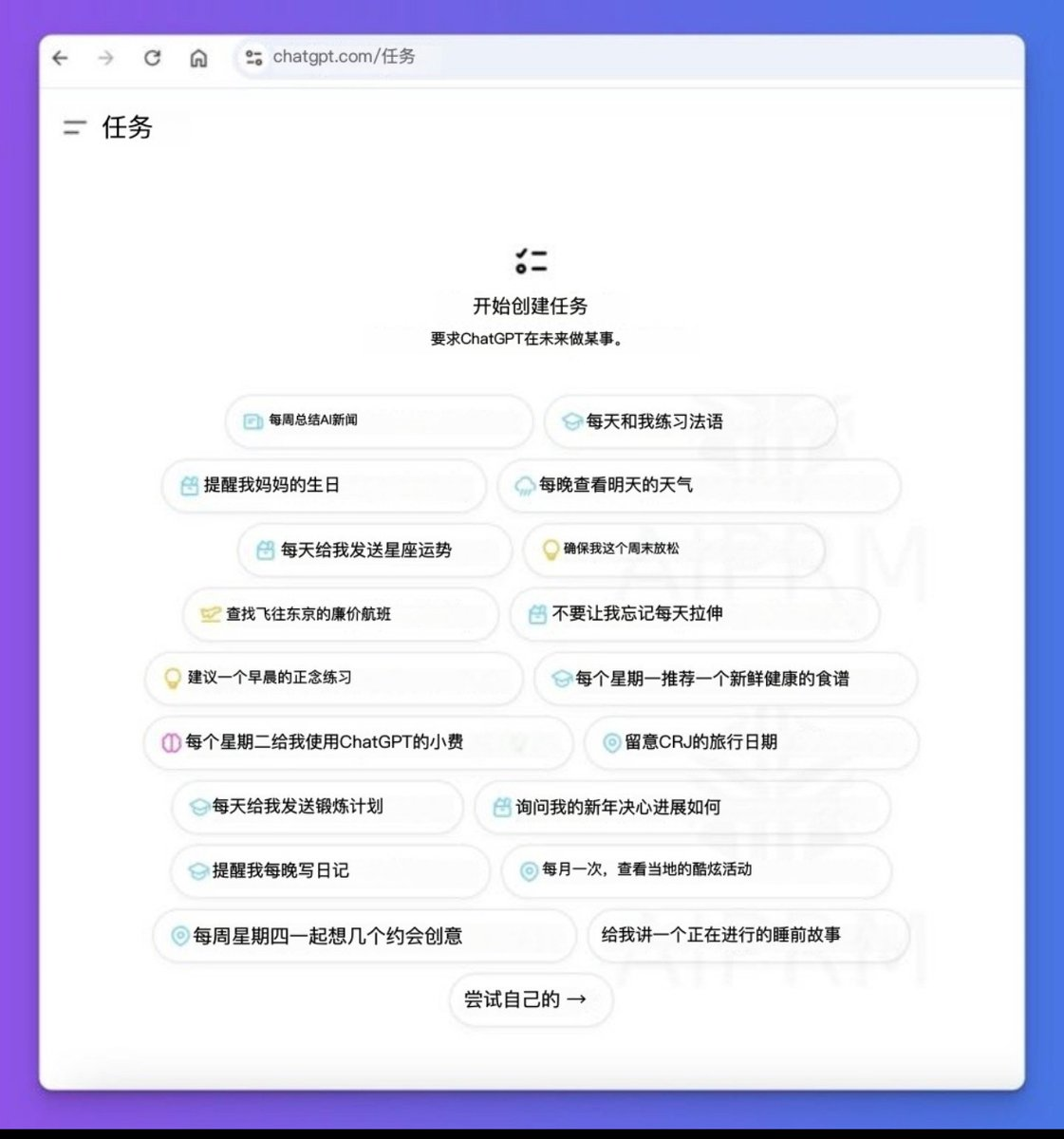
Based on the ChatGPT Tasks feature, we can implement requirements such as “automatically clock in every morning at 9:30.”
Consumer-Grade Applications
Computer Use is not yet ready for consumer-grade production deployment. Several problems need to be solved before it can be widely used:
- Overall response latency: The full end-to-end chain cannot achieve millisecond-level latency, making consumer commercialization very difficult. The overall user experience would feel highly fragmented.
- Device permissions: Screenshots and command execution both require very high permissions, unless Computer Use is built into the system layer from the beginning. That is why a device virtual machine was used in the demo, which provides the highest level of permissions.
- Ecosystem integration: There does not yet seem to be a consensus on how the ecosystem should be integrated into Agents, but MCP shows a trend toward standardized integration.
For example: asking AI to send me a red packet, buy a cup of coffee, etc. does not offer much advantage over directly using the UI manually. For now, I have not thought of a good landing scenario. It is more like an “iOS Shortcuts”-style RPA approach. In the future, if Computer Use uses Agents as the traffic entry point and integrates the ecosystem through MCP (such as food, entertainment, and lifestyle apps, README-style application manuals, etc.), it will be very imaginative.
Future
Vision
Looking at the film Her, released in 2013, the sci-fi scenario of AI helping humans operate computers to complete tasks is gradually becoming reality.


A New Generation of Human-Computer Interaction Paradigm
Human-in-the-loop
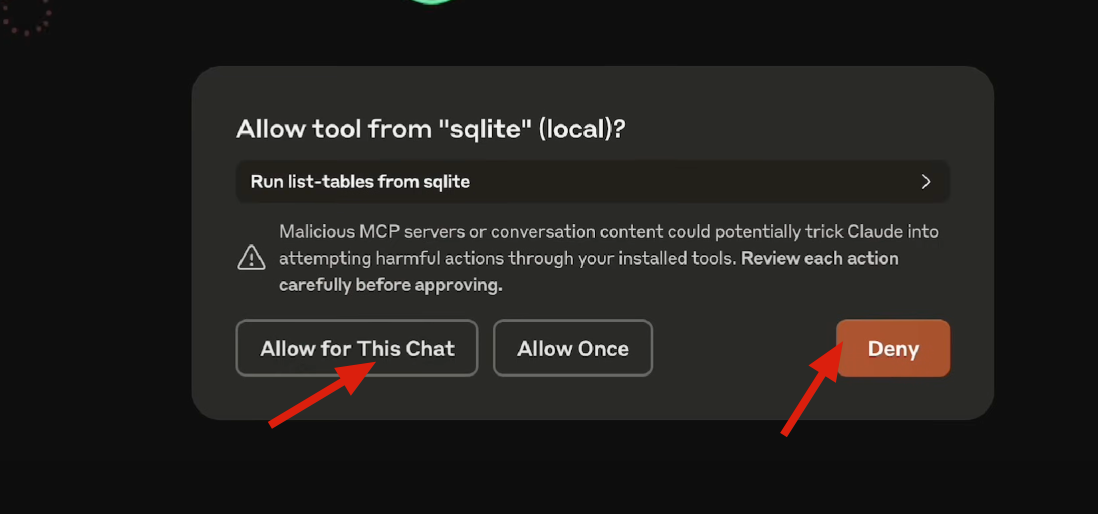
When a GUI Agent cannot handle something and needs human help, it hands control back to the human.
This is somewhat like the “safety driver” in “fully autonomous driving.” When AI capabilities are insufficient, humans step in, edge-case data is collected, and the AI is continuously iterated.
Bot-to-Bot Interaction
-
Collaboration and interaction with AI systems
-
Cross-platform and cross-system task handoff

GUI Agent uses AI Coding to generate a Snake game
Q & A
Why do I need AI to operate my device for me?
I had this question at first too. Having AI order coffee is not as fast or reliable as tapping a few times myself.
In the long run:
- Based on the two assumptions that “humans will become lazier and lazier” and “AI will become stronger and stronger,” once model capabilities reach a critical point, Computer/Phone Use will greatly improve the user experience.
- At that time, “humans operating devices” will be like “using horse-drawn carriages in the steam-engine era” or “manual driving under fully autonomous driving.” On that day, we will ask: “Why do humans need to operate devices themselves instead of using AI?”
Using the standards of the autonomous driving industry, GUI Agents can be classified as follows:
| Level | Name | Definition | Task Participation | Task Scenarios |
|---|---|---|---|---|
| L0 | No automation | The task is fully controlled by humans, and the automated system performs no operations. | Human | All |
| L1 | Basic computer assistance | The computer provides certain assistive functions, such as automation tools or suggestions, but final decisions are still made by the user. | Human | Limited (for example: automatic spell check, simple data entry autofill) |
| L2 (current) | Computer-assisted execution (Copilot stage) | The computer can perform certain operations in specific tasks, but the user still needs to intervene or supervise. | Human (80%) + AI (20%) | Limited. For example: user adjustment is required |
| L3 | Partial automation (Agent stage) | The computer can independently execute tasks in more situations, but still requires user intervention in specific cases. | AI (50%) + Human (50%) | Limited |
| L4 | High automation | The computer can automatically handle most task scenarios, with the user only supervising in specific cases. | AI (80%) + Human (20%) | Limited |
| L5 | Full automation | The computer completes tasks fully autonomously, without user intervention or operation. | AI (100%) | All |
Difference from RPA?
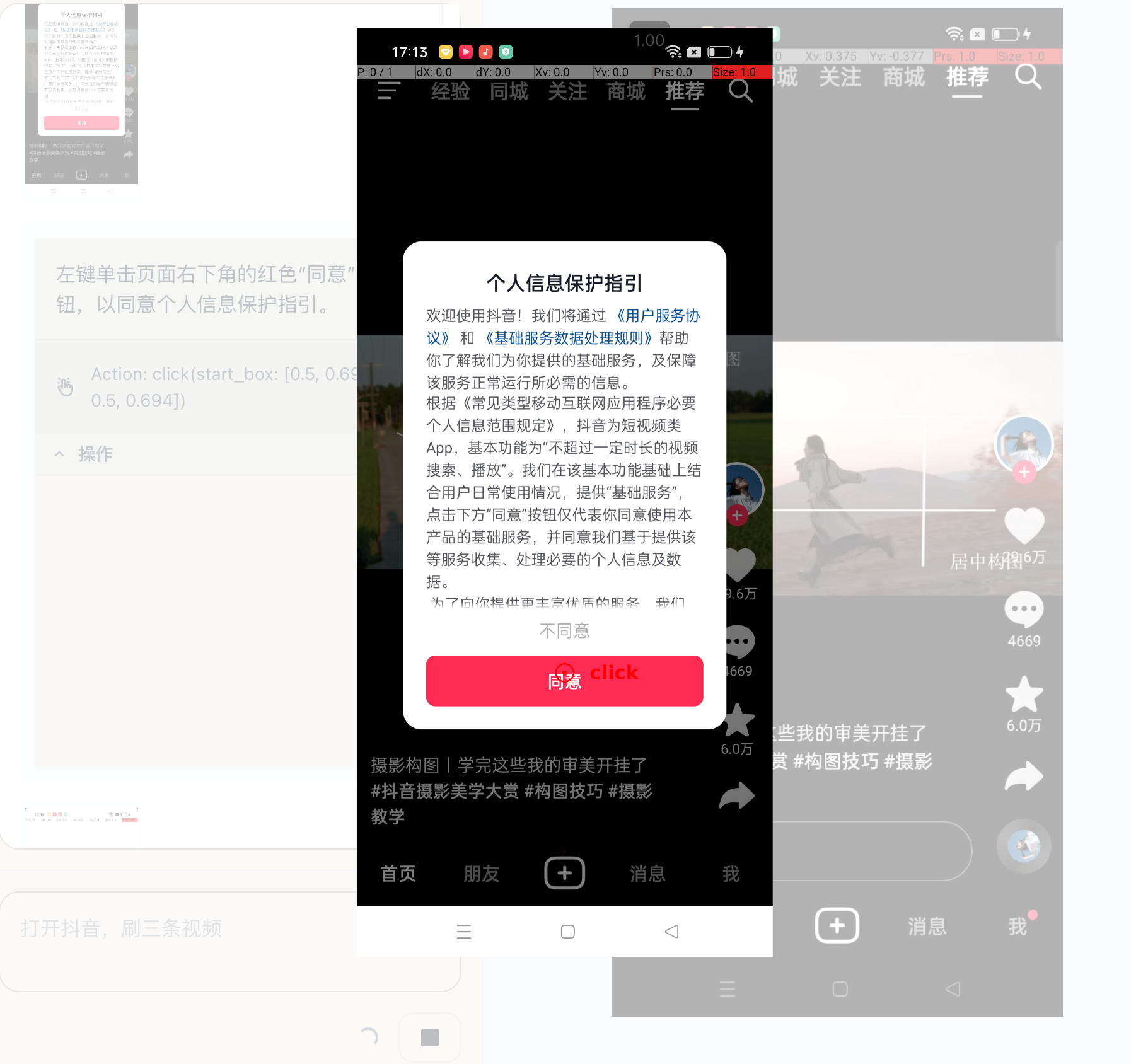
After receiving a “task instruction,” a GUI Agent lists an action plan and performs the next round of thinking, planning, and operation based on “real-time screen changes.” It can actively explore and trial-and-error on ++unknown interfaces++; RPA, on the other hand, is more about fixed-process operations. This is a huge difference.
For example, if a pop-up suddenly appears on the interface, a GUI Agent can handle it by clicking “Agree” or “Disagree.”
References
-
Introducing computer use, a new Claude 3.5 Sonnet, and Claude 3.5 Haiku
-
GitHub - showlab/computer_use_ootb: An out-of-the-box (OOTB) version of Anthropic Claude Computer Us
-
Zhipu Qingyan - AI Sent 20,000 Red Packets Live, Opening the Act Era of Large Models
-
“A Small Step” for Autonomous Agents: Today, Hand the Computer Over to Large Models
MCP-related:
Related papers:
-
[2501.12326] UI-TARS: Pioneering Automated GUI Interaction with Native Agents
-
[2411.17465] ShowUI: One Vision-Language-Action Model for GUI Visual Agent
-
[2410.08164] Agent S: An Open Agentic Framework that Uses Computers Like a Human
-
[2404.05719] Ferret-UI: Grounded Mobile UI Understanding with Multimodal LLMs
-
[2404.03648] AutoWebGLM: A Large Language Model-based Web Navigating Agent
-
[2312.08914] CogAgent: A Visual Language Model for GUI Agents
-
[2310.11441] Set-of-Mark Prompting Unleashes Extraordinary Visual Grounding in GPT-4V